Tesla One-Pedal Driving & Regenerative Braking (2026): How It Works, Range Gains & Keeping Your Brakes Healthy
Tesla One-Pedal Driving & Regenerative Braking (2026): How It Works, Range Gains & Keeping Your Brakes Healthy

一句话结论
How Tesla regenerative braking and one-pedal driving work in 2026 - Hold vs Creep, the new Model Y Reduced mode, real range gains, and how to stop underused brake rotors from rusting.
If you’re new to a Tesla, the strangest thing about the first drive isn’t the giant screen or the silence — it’s what happens when you lift your foot off the accelerator. The car slows down hard, all on its own, and comes to a complete stop without you ever touching the brake pedal. That’s regenerative braking paired with one-pedal driving, and once it clicks, most owners never want to drive any other way. It’s smoother, it saves your brakes, and it quietly adds range back to your battery every time you slow down.
This guide explains exactly how regen works on a 2026 Tesla, how to set up one-pedal driving, how much range it really recovers, and — the part almost nobody talks about — why barely using your friction brakes can create its own maintenance problem in the North American salt belt. Everything below is written for U.S. and Canadian owners and verified against Tesla’s own guidance.
Disclosure: some links are affiliate/referral links, and we may earn a commission at no extra cost to you. See our disclosure page.
📋 本文目录
- What Regenerative Braking Actually Does
- One-Pedal Driving: Hold, Roll, and Creep Explained
- What’s New in 2026: The Model Y “Reduced” Regen Mode
- How Much Range Does Regen Really Add?
- Cold Weather and “Regenerative Braking Limited”
- The Hidden Downside: Rust on Underused Brake Rotors
- One-Pedal Driving Safety and Getting the Technique Right
- Frequently Asked Questions
- The Bottom Line
What Regenerative Braking Actually Does
In a gas car, slowing down is pure waste: the brake pads clamp the rotors, turn your momentum into heat, and that energy disappears into the air. A Tesla flips this. When you lift off the accelerator, the electric motors run in reverse as generators. They resist the wheels — which slows the car — and convert that motion back into electricity that flows into the battery. You can watch it happen live: the power bar on the instrument display swings into the green (or shows a regen indicator on newer software) whenever regen is active.
Two things matter here. First, regen means the friction brakes stay idle most of the time, so brake pads and rotors last far longer than on a gas car — often well past 100,000 miles. Second, the recovered energy is real, if modest: the U.S. Department of Energy’s fueleconomy.gov credits regenerative braking as one of the core reasons EVs are so much more efficient than combustion cars, especially in stop-and-go city driving where you decelerate constantly.
Regen is strongest at higher speeds and tapers off as the car slows. Below roughly 4–5 mph, there isn’t enough motion left to generate meaningful electricity, so the car quietly hands off to the physical brakes to finish the stop — you won’t feel the transition.
One-Pedal Driving: Hold, Roll, and Creep Explained
“One-pedal driving” isn’t a separate mode — it’s the result of choosing the right Stopping Mode. On most Teslas you’ll find it under Controls > Pedals & Steering > Stopping Mode, with three options:
| Stopping Mode | What happens when you lift off | Best for |
|---|---|---|
| Hold | Regen slows you to a full stop, then the brakes hold the car until you press the accelerator. True one-pedal driving. | City, traffic, hills — the setting most owners use daily. |
| Roll | Regen slows you, but at very low speed the car rolls freely (like a car in neutral). You finish the stop with the brake pedal. | Drivers who want to coast the last few feet or park by feel. |
| Creep | Like Roll, but the car gently creeps forward at a stop, mimicking a gas automatic. | Newcomers transitioning from an automatic transmission. |
For genuine one-pedal driving, choose Hold. After a day or two your right foot learns to modulate the accelerator so precisely that the brake pedal becomes an emergency-only control. If you’re brand new to EVs, our Tesla first-time driver guide walks through the rest of the learning curve.
What’s New in 2026: The Model Y “Reduced” Regen Mode
For years, Tesla offered only one regen strength — full, “standard” regen — after quietly removing the old adjustable “Low” setting to protect its EPA range rating. The refreshed 2026 Model Y (Juniper) changes that. It reintroduces a lighter setting, this time labeled Reduced (found under the deceleration/regen settings), which lets the car coast more naturally when you lift off — closer to the feel of a gas car — without sacrificing the efficiency that the EPA test measures.
Tesla’s stated reason is customer feedback, particularly from owners in winter climates who find gentler deceleration feels more planted on snow and ice. The new Model Y’s brake system is also more tightly integrated: brake-pedal input can now blend with regen, so more of your everyday slowing is captured rather than dumped as heat. If you’re shopping the latest Model Y, our complete Model Y guide covers trims and pricing — and ordering a new one through a Tesla referral link currently adds 3 months of free Full Self-Driving (Supervised) to your account.
On every other current Tesla, regen strength isn’t adjustable — you simply get full regen, and you tune the feel through the Stopping Mode instead.
How Much Range Does Regen Really Add?
Regen won’t magically double your range, but its contribution is meaningful — and it grows the more you brake. In flat highway cruising you barely slow down, so regen does little. In dense city traffic, or on a long mountain descent, regen can recover a surprising amount: on a big downhill you’ll often see the projected range climb as the battery fills back up.
The single best way to maximize both regen and overall efficiency is to keep your tires at Tesla’s recommended pressure. Under-inflated tires add rolling resistance that quietly eats range every mile. A cheap, accurate digital tire-pressure gauge (around $10–15) lets you check pressures cold in your driveway rather than trusting a gas-station stick — a two-minute habit that pays for itself in recovered miles. For the full efficiency playbook, see our guide to maximizing Tesla range.
Smooth, anticipatory driving matters as much as any gadget. Natural Resources Canada’s fuel-efficient driving research and the DOE’s driving-habits data both find that gentle acceleration and reading traffic ahead cut energy use dramatically — and in an EV, that means feeding more energy back through regen instead of wasting it on hard stops.
Cold Weather and “Regenerative Braking Limited”
Here’s a scenario every northern owner meets in the first cold snap: you pull out of the driveway on a −10°C morning, lift off the accelerator expecting the usual strong deceleration — and the car barely slows, coasting forward as if in neutral. A dashed line appears over the power meter and a “Regenerative braking is limited” message pops up. Nothing is broken.
A cold lithium-ion battery can’t safely absorb a fast inrush of charge, so the car temporarily dials regen back to protect it. As the battery warms — from driving or from active heating — full regen returns and the dashed line disappears. Two habits fix this:
- Precondition before you leave. Use the Tesla app to warm the cabin and battery while still plugged in. A warm pack means full regen from the moment you pull out — and better range all day.
- Plan to lose a little regen anyway. On very cold mornings, keep more distance and expect to use the brake pedal more than usual until the battery comes up to temperature.
Because the cabin heater is one of winter’s biggest energy drains, many owners keep the cabin a couple of degrees cooler and lean on a 12V heated seat cushion for direct warmth — a small trick that leaves more energy for driving (and regen). For the whole cold-weather picture, see our Tesla winter range guide.
The Hidden Downside: Rust on Underused Brake Rotors
Regen is so effective that on a normal commute your friction brakes may not firmly engage for days or even weeks. That’s great for pad life — but it creates a problem unique to EVs, and it hits the Canadian and U.S. “salt belt” hardest. Bare cast-iron rotors that rarely get scrubbed by the pads sit exposed to rain, humidity, and road salt, and they corrode. Left long enough, surface rust can turn into pitting, uneven braking, squealing, or in bad cases a rotor that needs early replacement despite low mileage.
This isn’t a reason to avoid one-pedal driving — it’s a reason to do three simple things:
- Scrub the rotors on purpose now and then. A few times a month (and after driving on salted roads), find a safe, empty stretch and brake firmly from about 45–50 mph down to 10 mph a couple of times. This “burnishes” the rotors — the pads wipe the rust film off and restore a clean surface.
- Keep the wheel area clean. Rinse road salt off after winter drives. A can of non-chlorinated brake parts cleaner (about $6–10) lets you spray down accessible rust film and grime when you rotate tires or do a wheel wash — a standard detailing step that keeps corrosion from building up. Tracking salt in and out also chews up your cabin, so a good set of all-weather floor mats is worth having through the winter months.
- Follow Tesla’s cold-climate service note. This is official, not folklore: on its vehicle maintenance page, Tesla recommends that owners who drive on salted roads have the brake calipers cleaned and lubricated every year or 12,500 miles (about 20,000 km). Tesla also recommends testing brake fluid roughly every four years and replacing it if needed.
Do these and your brakes will comfortably outlast most gas-car brakes. Ignore them in a salty climate and you can end up replacing rotors early — the one way regen can actually cost you money. Our battery health guide covers the other long-term maintenance items worth staying ahead of.
One-Pedal Driving Safety and Getting the Technique Right
One-pedal driving changes how your car behaves, so a few technique notes are worth internalizing:
- Your brake lights still work. When regen slows the car meaningfully, Tesla automatically illuminates the brake lights, so drivers behind you get the same warning as a gas car braking.
- The brake pedal is always there. Regen is not your emergency brake. For hard or panic stops, hit the pedal — the friction brakes and anti-lock system are far stronger than regen alone, and pressing the brake also engages the traction and stability systems fully.
- Ease off on slick surfaces. Strong regen on ice or wet leaves can briefly unsettle the rear wheels. Lift off the accelerator gradually rather than snapping your foot up, or use the 2026 Model Y’s Reduced setting if you have it.
- Give yourself a day. The muscle memory comes fast. Within a day or two, holding the car steady on a hill or feathering to a smooth stop becomes automatic — and going back to a two-pedal car feels clumsy.
Thinking about buying your first Tesla to try all this for yourself? If you order a new Model 3, Model Y, or Cybertruck through a Tesla referral link, you currently get 3 months of free Full Self-Driving (Supervised) added to your account — a genuine perk at no cost to you, though it generally can’t be combined with the standard 30-day trial. For more ownership tips, browse our full library of US Tesla guides.
Frequently Asked Questions
Can I turn regenerative braking off on my Tesla?
Not fully. On current Teslas regen strength is fixed at “standard,” and you can only change the Stopping Mode (Hold, Roll, or Creep) — not switch regen off. The one exception is the 2026 Model Y, which adds a lighter “Reduced” setting for gentler deceleration. Even then, some regen is always active because it’s core to how the car drives and charges.
Does regenerative braking wear out the battery faster?
No. Regen delivers a gentle charge that’s well within the battery’s normal operating limits — the system deliberately limits it when the pack is cold or nearly full precisely to protect long-term battery health. It has no meaningful negative effect on battery lifespan.
Why does my Tesla barely slow down when I lift off in winter?
Because the battery is cold. A cold pack can’t safely accept a fast charge, so the car temporarily reduces regen and shows a dashed line and a “Regenerative braking is limited” message. Precondition the car (warm it via the app while plugged in) before you leave, and full regen returns as the battery warms up.
Do Tesla brakes really last longer than a gas car’s?
Yes — often dramatically. Because regen does most of the slowing, friction pads and rotors can last well beyond 100,000 miles. The catch is corrosion: rarely-used rotors can rust in humid or salted climates, so occasional firm braking and Tesla’s recommended caliper cleaning in salt regions matter more than pad wear does.
Should I use Hold or Creep mode?
Use Hold for true one-pedal driving — it’s what most experienced owners prefer and it’s easiest on your brakes. Creep is a comfortable starting point if you’re just switching from a gas automatic and want the familiar low-speed crawl; you can move to Hold once the car feels natural.
The Bottom Line
- Regen recovers energy and saves your brakes. Lifting off turns the motors into generators, slowing the car while recharging the battery — and keeping the friction brakes idle most of the time.
- Set Stopping Mode to Hold for genuine one-pedal driving; use Roll or Creep only if you specifically want the car to coast or crawl at low speed.
- 2026 Model Y owners get a new “Reduced” regen option for a gentler, more gas-like feel, especially useful in winter — no other current Tesla offers adjustable regen.
- Cold batteries limit regen temporarily. Precondition before driving to restore full regen and range.
- Watch the rotors, not the pads. In the salt belt, brake firmly on purpose now and then, keep the wheels clean, and follow Tesla’s yearly caliper cleaning recommendation so underused brakes don’t rust.
New to Tesla and ready to experience one-pedal driving first-hand? Ordering a new Model 3, Model Y, or Cybertruck through a Tesla referral link currently earns you 3 months of free Full Self-Driving (Supervised) at no extra cost.
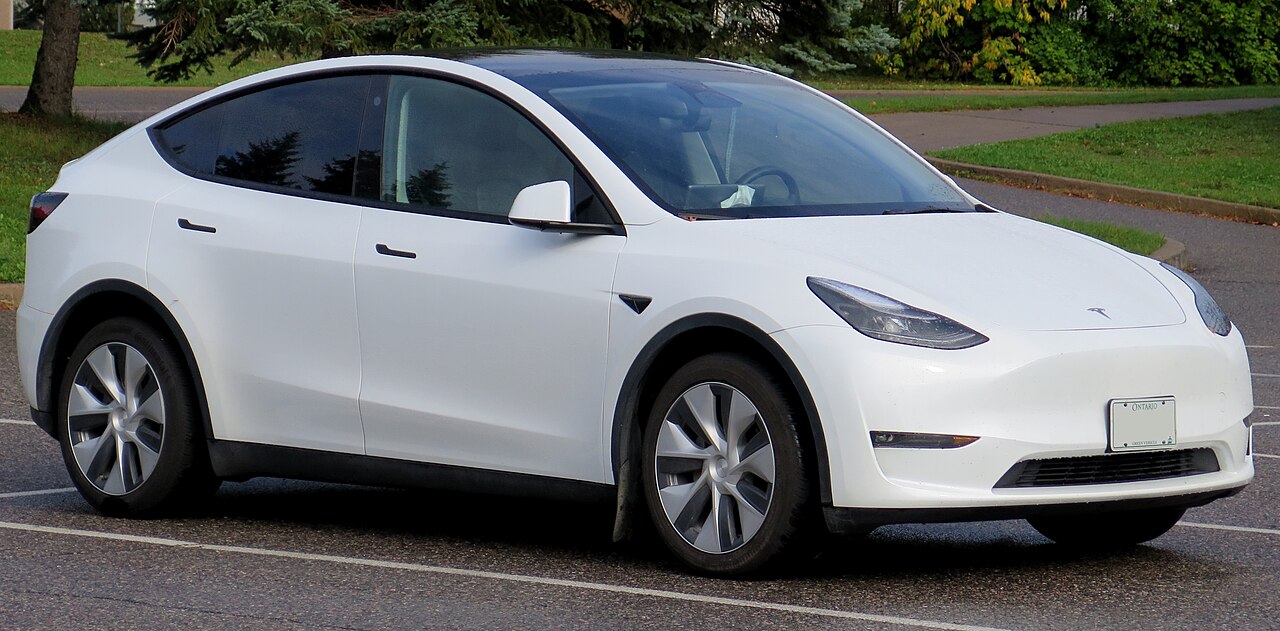
Information verified as of August 2026 against Tesla’s official support documentation, fueleconomy.gov, and Natural Resources Canada. Settings menus, mode names, and service intervals can change with software updates and by model year — always confirm in your own car’s menus and owner’s manual. This article is for general information only and is not professional automotive or safety advice. Some links are affiliate or referral links; see our disclosure page. Image credit: Tesla Model Y photo by Elise240SX, licensed under CC BY-SA 4.0, via Wikimedia Commons.