
Tesla Supercharger Idle Fees and Congestion Fees: How to Avoid Them (2026)
Tesla Supercharger Idle Fees and Congestion Fees: How to Avoid Them (2026)

In one sentence
Tesla Supercharger idle fees and congestion fees can add up fast at busy stops. Here's exactly when they apply in 2026 and how to avoid paying a cent.
Fast, reliable charging is one of the biggest reasons people buy a Tesla in the first place. But on a holiday weekend or at a packed highway stop, two extra charges can quietly show up on your bill: the idle fee and the newer congestion fee. Neither one has anything to do with the electricity you actually use — they are penalties for keeping a stall occupied when other drivers are waiting.
The good news is that both fees are completely avoidable once you understand exactly when they kick in. This 2026 guide breaks down how idle fees and congestion fees work in the United States, what they cost per minute, and the simple habits that keep every Supercharger stop free of surprise charges.
Disclosure: some links are affiliate/referral links that may earn us a small commission at no extra cost to you. See our disclosure page.
📋 Contents
- Idle Fees vs. Congestion Fees: What’s the Difference?
- How Tesla Idle Fees Work
- How Congestion Fees Work (the 80% Rule)
- How to Avoid Idle and Congestion Fees
- How to Tell If Fees Apply: Your Screen and the Tesla App
- A Small Charging-Stop Kit That Saves Time
- Buying a Tesla and Getting Supercharger Access
- Frequently Asked Questions
- The Bottom Line
Idle Fees vs. Congestion Fees: What’s the Difference?
Tesla uses two separate tools to keep stalls flowing, and it is easy to mix them up. An idle fee applies after your car has finished charging and you leave it plugged in. A congestion fee applies while you are still charging, once your battery climbs past a high state of charge at a busy site. Importantly, the two are mutually exclusive — a given stall will apply congestion fees or idle fees at any moment, never both at once.
Here is the quick comparison before we dig into each one:
| Feature | Idle fee | Congestion fee |
|---|---|---|
| When it applies | After your car reaches its charge limit and stays plugged in | While charging, once your battery is at or above the “congestion limit” (about 80%) |
| Site condition required | Station 50% or more occupied | Site flagged as busy by Tesla |
| Typical rate | About $0.50/min (50%+ full), doubling to about $1.00/min (100% full) | A flat per-minute rate, commonly around $0.50–$1.00/min depending on the site |
| Grace period | 5 minutes to unplug and leave | 5 minutes after reaching the congestion limit |
| Goal | Get finished cars to move so others can plug in | Encourage drivers to stop around 80% instead of charging to 100% |
Rates and exact triggers can vary by location and change over time, so always confirm the numbers on the charger’s on-screen pop-up before you plug in. For a full breakdown of what the electricity itself costs, see our companion guide to Tesla Supercharger pricing and membership.
How Tesla Idle Fees Work
Idle fees are the older of the two and the easiest to understand. Once your car hits the charge limit you set — say 80% or 90% — charging stops, but your Tesla is still parked in a stall that someone else could be using. To discourage drivers from treating a Supercharger like a parking spot, Tesla starts an idle-fee meter, but only when the site is busy enough to matter.
The rules that hold in 2026:
- Idle fees only apply when the station is at least 50% occupied. At an empty or quiet site, you can sit as long as you like with no idle charge.
- When the station is more than half full, the rate is about $0.50 per minute.
- When the station is 100% full, the rate doubles to about $1.00 per minute.
- You get a five-minute grace period to unplug and drive away before any idle fee is charged.
- The fee stops the moment you move your car, and Tesla waives it entirely if you leave within the grace window.
The math adds up quickly. An hour of idle time at a fully occupied station can cost roughly $60 — far more than the charging session itself. The Tesla app sends a push notification the moment your car is done, so treat that alert as your cue to wrap up your coffee and head back to the car.
How Congestion Fees Work (the 80% Rule)
Congestion fees are Tesla’s newer answer to a stubborn problem: the last 20% of a charge is the slowest part of the curve. A driver crawling from 80% to 100% ties up a stall for a long time while adding relatively few miles. To nudge people to unplug earlier, Tesla applies a congestion fee at select busy sites once your battery passes a “congestion limit” — widely reported as around 80% state of charge.
Key points to remember:
- Congestion fees appear only at sites Tesla has flagged as busy. Most Superchargers most of the time will never charge you one.
- The fee is a flat per-minute rate — reported in the U.S. in the range of roughly $0.50 to $1.00 per minute depending on the location.
- You get a five-minute grace period after your battery reaches the congestion limit (or after your session ends, if your charge limit is set below 80%).
- Because they are mutually exclusive with idle fees, a congested site charges by the minute while you are plugged in above 80%, not after you finish.
The takeaway is simple: at a busy site, plan to unplug at 80%. Modern Teslas have plenty of range, and stopping at 80% is faster, cheaper, and gentler on the battery. If you need to reach 100% for a long leg, do it at a quiet site or overnight at your destination. Our guide to preconditioning and charging speed explains how to spend the least possible time plugged in.
How to Avoid Idle and Congestion Fees
Every one of these charges is optional if you build a few habits. Here is the practical checklist that keeps Supercharger stops free of extra fees:
- Set a realistic charge limit. On a road trip, charging to 80% is usually all you need to reach the next stop. It sidesteps the congestion window entirely and gets you back on the road sooner.
- Watch the app. The Tesla app shows live charging progress and pushes an alert when you are done. Keep your phone handy so the five-minute idle clock never catches you off guard.
- Stay close at busy sites. If the station is packed, grab a quick snack rather than a sit-down meal, and keep an eye on the time.
- Read the on-screen pop-up. Before you plug in, the charger’s touchscreen pop-up shows whether idle or congestion fees are active at that site. Software updates from 2023.38 onward display this clearly.
- Precondition before you arrive. Navigating to a Supercharger warms the battery so it charges at full speed, which means less time in the stall and less exposure to either fee.
- Choose off-peak stops when you can. Early mornings and late evenings are far less likely to trigger congestion pricing than midday holiday rushes.
Whenever possible, do your bulk charging at home, where electricity is cheaper and idle or congestion fees simply do not exist. Our guide to home charging on time-of-use rates shows how to cut your cost per mile to a fraction of Supercharger pricing.
How to Tell If Fees Apply: Your Screen and the Tesla App
You are never left guessing. When you select a Supercharger on the map or plug in, the touchscreen pop-up lists that site’s rate structure, including whether idle or congestion fees are in effect. During a session, if you cross the threshold for a fee, both the vehicle touchscreen and the Tesla app notify you that the meter is running.
Those notifications are the single most useful tool for avoiding charges. If you tend to walk away and lose track of time, turn on Tesla app notifications and keep your phone’s volume up. The alert that your car has finished, or that congestion fees now apply, is your five-minute warning to come back and unplug.
A Small Charging-Stop Kit That Saves Time
Spending less time at the charger is the surest way to dodge these fees, and a few inexpensive items make every stop smoother and quicker. None of this is essential, but each piece earns its place in the frunk on a long trip.
When a Supercharger is jammed and racking up congestion fees, the fastest fix is sometimes to skip it entirely and top up on a nearby Level 2 charger while you eat. Most public J1772 stations are not Tesla-branded, so a Lectron J1772-to-Tesla (NACS) adapter lets your car plug into virtually any of them — a genuinely useful piece of kit that costs a fraction of one congested charging session and pays for itself the first time you avoid a $1-per-minute meter. (For the full rundown on adapters, see our NACS adapter guide.)
Because no Tesla comes with a spare tire, two more items belong in the trunk before any long drive. A compact portable tire inflator lets you top up a slightly low tire in the couple of minutes your car is already charging, and a tire repair kit can plug a slow leak and get you to the next town without a tow. Prices for both sit comfortably in the budget range.
Finally, if you like to run Sentry Mode while you step away from the car, a small, fast USB flash drive formatted for Dashcam and Sentry gives you peace of mind at a crowded, unfamiliar stop for well under the price of a tank of gas.
Buying a Tesla and Getting Supercharger Access
Every new Tesla comes with built-in access to the Supercharger network — no membership required for owners, who simply pay per kilowatt-hour plus any idle or congestion fees. The car handles billing automatically through your Tesla account, so there is nothing to swipe or tap.
If you are still deciding on a purchase, ordering a Model 3, Model Y, or Cybertruck through a referral link currently adds three months of free Full Self-Driving (Supervised), worth roughly $297, though it generally can’t be combined with the standard 30-day trial. It costs you nothing extra and is the easiest perk to claim at the moment you place your order. If you are ready to configure a car, simply order through the referral link to lock in those three free months of FSD (Supervised). You can browse more model-specific advice across our US Tesla guides.
Frequently Asked Questions
How much are Tesla idle fees?
Idle fees run about $0.50 per minute when a Supercharger station is more than half occupied, doubling to about $1.00 per minute when the station is completely full. They only apply after your car has finished charging and remains plugged in, and there is a five-minute grace period to leave before any fee is charged.
What triggers a Tesla congestion fee?
A congestion fee applies at sites Tesla has flagged as busy, once your battery reaches the congestion limit — reported as around 80% state of charge. Unlike an idle fee, it accrues while you are still charging. You get a five-minute grace period after hitting that threshold before the per-minute meter starts.
Can I be charged an idle fee and a congestion fee at the same time?
No. The two fees are mutually exclusive. At any given moment a stall applies either congestion fees (while you charge above the limit) or idle fees (after you finish), never both together.
How do I avoid Supercharger fees completely?
Set your charge limit to about 80% at busy sites, keep the Tesla app open so you see the completion and fee alerts, and unplug within the five-minute grace window. Charging at home whenever possible avoids both fees entirely and costs far less per mile.
Do idle fees apply at empty Superchargers?
No. Idle fees only start when a station is at least 50% occupied. At a quiet site you can remain plugged in after charging finishes without paying an idle fee — though it is still good etiquette to move along.
Does the Tesla warn me before I get charged?
Yes. The charger’s touchscreen pop-up shows the site’s fee structure before you plug in, and both the car’s screen and the Tesla app notify you when a fee begins to apply, giving you time to respond within the grace period.
The Bottom Line
- Idle fees apply after charging finishes at a station that is 50%+ full — about $0.50/min, doubling to $1.00/min when 100% full, after a 5-minute grace period.
- Congestion fees apply while charging above roughly 80% at busy sites, at a flat per-minute rate, after a 5-minute grace period.
- The two fees are mutually exclusive and both are fully avoidable.
- Charge to about 80% at busy sites, watch the app, unplug within five minutes, and precondition to charge faster.
- Do your bulk charging at home to skip Supercharger fees altogether and pay less per mile.
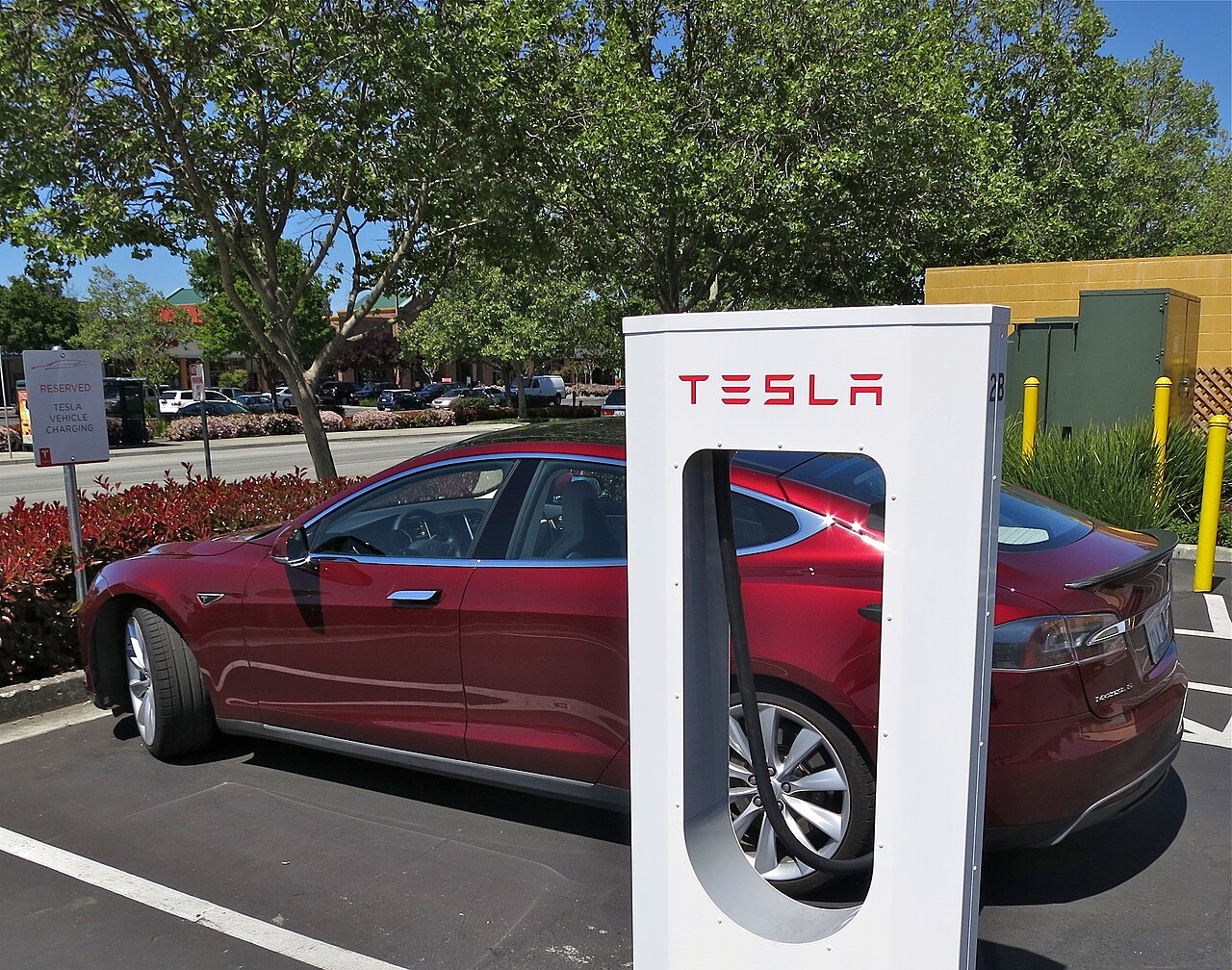
Information current as of August 2026 and subject to change; Supercharger fees and thresholds vary by location and can be updated by Tesla at any time — always confirm the rate on the charger’s on-screen pop-up. This article is general information, not financial or legal advice, and contains affiliate/referral links (see our disclosure page). Verify current details with Tesla’s official Supercharger fees page, the U.S. Department of Energy Alternative Fuels Data Center, and FuelEconomy.gov. Image credit: Steve Jurvetson, “Tesla Supercharging in Gilroy”, CC BY 2.0, via Wikimedia Commons.
About the author: Lifei Zhou
Model Y owner since 2022Ontario STO registered apprentice · 310SWorks on Porsche, Mercedes, BMW, Audi weeklyHundreds of readers referred (est.)
Lifei is a Tesla owner based in Canada, writing practical, fact-checked Tesla guides for US and Canadian drivers — buying, ownership, insurance, charging, and TSLA investing, all from first-hand experience.