
How to Clean a Tesla (2026): Car Wash Mode, Screen & Interior Detailing Guide
How to Clean a Tesla (2026): Car Wash Mode, Screen & Interior Detailing Guide

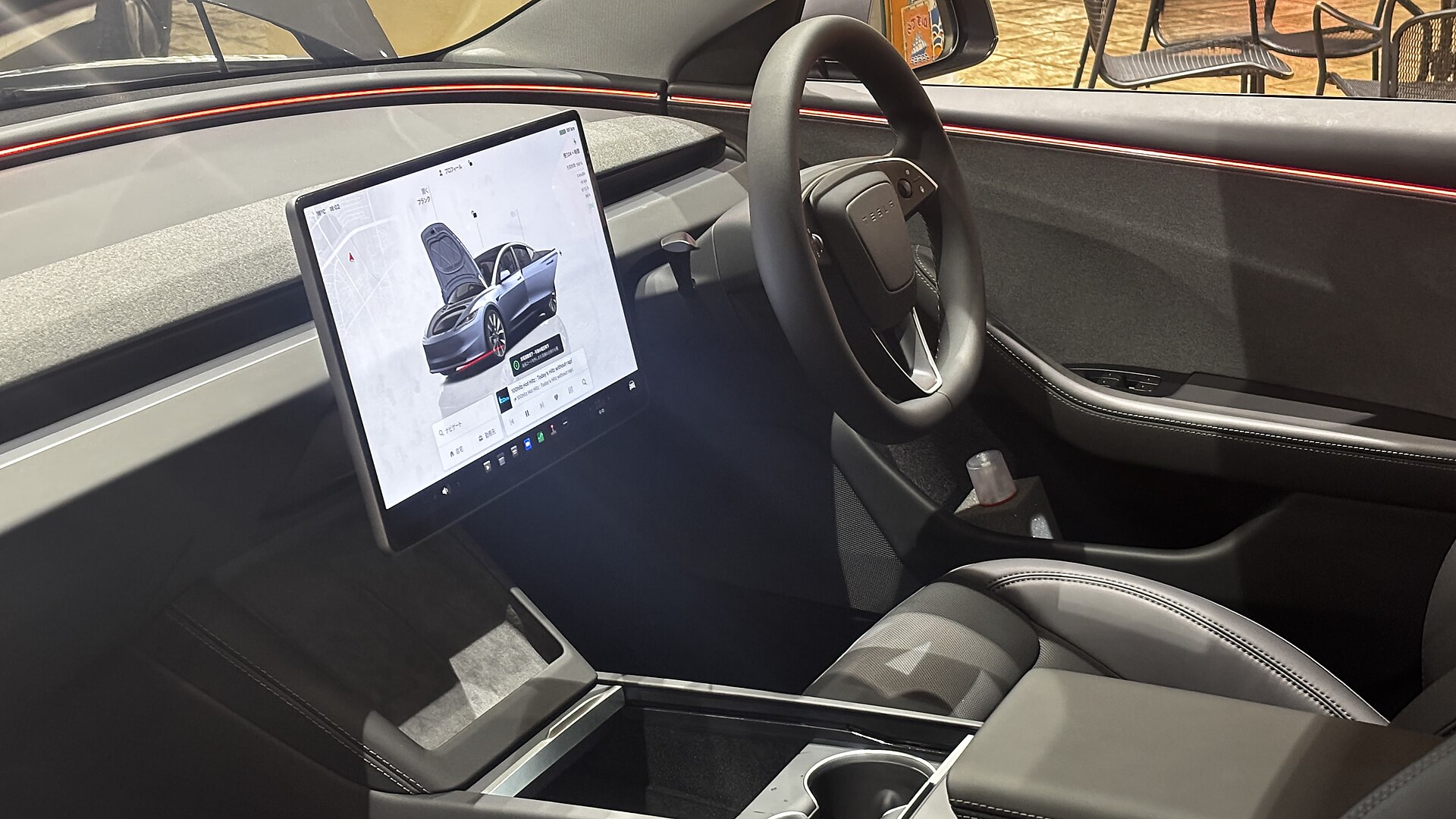
A Tesla wears its cleanliness on its sleeve. The huge glass roof, the piano-black center console, and that big landscape touchscreen all show every fingerprint, water spot, and speck of dust. The good news is that keeping a Tesla looking showroom-fresh is genuinely easy once you know the handful of rules that are different from a normal gas car — starting with the built-in Car Wash Mode and the “no glass cleaner on the screen” rule that trips up so many new owners.
This guide walks through the whole routine for 2026 Model 3, Model Y, Model S, Model X and Cybertruck owners in the U.S. and Canada: how to run an automatic or hand wash safely, how to clean the touchscreen without wrecking the anti-glare coating, how to treat the vegan-leather seats and Alcantara trim, and a simple product kit that covers 95% of the job.
Disclosure: some links are affiliate/referral links. If you buy or sign up through them we may earn a commission at no extra cost to you. See our disclosure page.
📋 Contents
- Car Wash Mode: What It Does and How to Turn It On
- Automatic Wash vs. Hand Wash: Which Is Safe?
- Cleaning the Touchscreen the Right Way
- Interior Detailing: Seats, Dash, Vegan Leather and Alcantara
- Wheels, Tires, Glass and the Frunk
- Keeping It Clean Longer: Ceramic Spray and PPF
- A Simple Tesla Cleaning Kit
- Frequently Asked Questions
- The Bottom Line
Car Wash Mode: What It Does and How to Turn It On
Tesla builds a dedicated Car Wash Mode into every current model, and you should use it whether you’re rolling through an automatic tunnel or washing by hand at home. Tap Controls > Service > Car Wash Mode. The car has to be stopped and unplugged.
Turning it on does several things at once: it closes all the windows, locks the charge port so water can’t force it open, and disables the windshield wipers, Sentry Mode, walk-away door locks, and the parking-sensor chimes. That last part matters — without Car Wash Mode, Sentry can burn through storage recording the wash and the proximity sensors will ping constantly.
A couple of things to know. Car Wash Mode automatically switches off once the car exceeds about 9 mph (15 km/h), so it won’t stay on as you drive away. And if you’re using a conveyor-style automatic wash, press the brake and tap Enable Free Roll (or shift to Neutral) so the car rolls through in Neutral without the parking brake grabbing. Confirm the details in your car’s official owner’s manual, since exact behavior varies slightly by model and software version.
Automatic Wash vs. Hand Wash: Which Is Safe?
Yes, you can take a Tesla through an automatic car wash — with Car Wash Mode on and Free Roll enabled. But not all automatic washes are equal, and Tesla itself advises against certain types.
| Wash type | Tesla-friendly? | Notes |
|---|---|---|
| Touchless (high-pressure, no brushes) | Best option | No swirl marks; safest automatic choice. |
| Soft-cloth conveyor | OK with Free Roll | Fine occasionally; cloth can leave light micro-marring over time. |
| Hard-bristle / older brush tunnels | Avoid | Can scratch paint, sensors and cameras. |
| Two-bucket hand wash | Gold standard | Most control, least risk of swirls. |
For a hand wash, the two-bucket method is worth the extra ten minutes: one bucket with pH-neutral car wash soap and one with plain rinse water, each fitted with a grit guard so dirt settles to the bottom instead of going back on your mitt. Use a plush wash mitt, work top to bottom, and dry with a large plush microfiber drying towel rather than letting it air-dry — that’s what causes water spots on the glass roof. A foam cannon on a pressure washer makes the pre-rinse even gentler by lifting grit before you ever touch the paint.
Short on time or water? A quality rinseless (waterless) wash is perfect for apartment dwellers and condo garages where you can’t run a hose — spray, wipe with a clean microfiber, flip to a dry side, done.
Cleaning the Touchscreen the Right Way
This is the single most important rule for a Tesla, and it’s the opposite of what most people assume. Do not use glass cleaner, Windex, alcohol wipes, or any household cleaner on the touchscreen. Tesla’s displays have an anti-glare coating that these products strip away, leaving a permanently cloudy, blotchy screen that isn’t covered under warranty.
The correct method:
- Put the screen to sleep first — hold both scroll wheels, or use Controls > Display > Clean Screen / Screen Off so touches don’t register while you wipe.
- Use a clean, soft microfiber screen cloth — the kind made for monitors and camera lenses.
- If a dry cloth won’t cut it, lightly dampen the cloth (never the screen) with distilled water only, or use a display-safe cleaner explicitly rated as ammonia- and alcohol-free.
- Wipe gently in one direction; don’t scrub.
The same “no harsh chemicals” logic applies to the piano-black plastic around the shifter stalks and cupholders — those glossy panels scratch if you wipe them dry with grit on the cloth, so use a damp microfiber and light pressure. Tesla’s own interior cleaning documentation spells out the approved approach in more detail.
Interior Detailing: Seats, Dash, Vegan Leather and Alcantara
Every current Tesla uses synthetic “vegan leather” seating, which is far easier to maintain than real hide. For routine cleaning, a damp microfiber is often enough. For scuffs, denim dye transfer (a real problem on white interiors), or ground-in grime, use a dedicated synthetic-leather interior cleaner and a soft brush, then wipe dry. Avoid anything with heavy silicone that leaves a greasy, glare-prone sheen on the dash.
Keep a stack of quality microfiber towels on hand — color-code them so your paint towels never touch the wheels. For the fine dust that collects in the dash seams, air vents, and cupholders, a set of soft detailing brushes plus a compact cordless car vacuum makes quick work of the footwells, seat crevices, and that hard-to-reach area under the seats.
Alcantara caution: some Model S and Model X trims use Alcantara on the headliner or dash. Do not soak it with water-based cleaners. Dust it with a dry microfiber for routine care; for stains, use an Alcantara-specific cleaner sparingly and brush gently in one direction so the nap doesn’t mat. For the carpeted floor mats and any all-weather rubber mats, pull them out and rinse or vacuum separately.
Because Sentry Mode and Dashcam record onto a USB drive, a clean cabin also keeps your camera glass and interior cam clear — worth a quick wipe if you rely on footage. Our Sentry Mode & Dashcam guide covers the drive and camera-care side in depth.
Wheels, Tires, Glass and the Frunk
Do the wheels first, before the paint, with a separate mitt or brush and a dedicated pH-balanced wheel cleaner — brake dust is abrasive, and you never want it migrating onto your paint towels. If your Model Y or Model 3 has the aero covers, pop them off to rinse behind them occasionally.
For glass, skip ammonia-based cleaners (they can haze tint) and use an automotive ammonia-free glass cleaner with a dedicated glass microfiber. The huge glass roof shows streaks in direct sun, so clean it in the shade. Don’t forget the frunk and the trunk well — road grime and spilled groceries collect there, and a quick vacuum keeps odors down.
Keeping It Clean Longer: Ceramic Spray and PPF
The easiest way to spend less time washing is to make dirt struggle to stick in the first place. After a wash, a ceramic spray coating lays down a hydrophobic layer so water beads off and bugs and dust rinse away with far less effort. It takes ten minutes and lasts a few months — a great middle ground between nothing and a full professional ceramic coat.
For long-term protection, many owners in salty-winter regions add paint protection film (PPF) to high-impact areas — the front bumper, hood, and rocker panels — and an interior screen protector. If you’re weighing bigger-picture protection and upkeep costs, our Tesla maintenance & service guide puts detailing in context with the rest of ownership, and winter owners should also read our Tesla winter driving guide for road-salt and slush strategy. New owners can also see our full Tesla new-owner accessories list for the rest of the kit.
Still shopping for the Tesla you’ll be detailing? If you order a new Tesla through a Tesla referral link, you currently get 3 months of free Full Self-Driving (Supervised) — a nice bonus on top of a car that’s genuinely easy to keep clean.
A Simple Tesla Cleaning Kit
You don’t need a detailing van’s worth of gear. This short list handles almost everything above, and most items are inexpensive on Amazon:
- A dozen microfiber towels (color-coded: paint, glass, wheels, interior).
- A screen-safe microfiber cloth kept just for the touchscreen.
- pH-neutral car wash soap + two buckets with grit guards, or a rinseless wash for garages.
- Vegan-leather interior cleaner and a soft brush.
- Wheel cleaner and a separate wheel mitt.
- Ammonia-free glass cleaner.
- A cordless car vacuum and a set of detailing brushes.
- Ceramic spray to make future washes faster.
Canadian readers can find the same categories on Amazon.ca, though selection and pricing vary north of the border.
Frequently Asked Questions
Can I take my Tesla through an automatic car wash?
Yes. Turn on Car Wash Mode (Controls > Service > Car Wash Mode) so the windows close, the charge port locks, and Sentry and the wipers are disabled. For conveyor tunnels, tap Enable Free Roll or shift to Neutral. Prefer touchless or soft-cloth washes and avoid old hard-bristle brush tunnels.
Why can’t I use Windex or glass cleaner on the touchscreen?
Tesla’s screens have an anti-glare coating that ammonia- and alcohol-based cleaners strip away, leaving a permanent cloudy haze that isn’t covered by warranty. Use a dry or distilled-water-dampened microfiber screen cloth only.
How do I put the Tesla screen to sleep before cleaning?
Press and hold both steering-wheel scroll buttons, or use the Clean Screen / display-off option in Controls. This blanks the display so your wiping doesn’t trigger settings changes.
What’s the best way to clean white vegan-leather seats?
For everyday marks, a damp microfiber often works. For denim dye transfer or scuffs, use a dedicated synthetic-leather cleaner with a soft brush, then wipe dry. Skip greasy silicone dressings that leave glare on the dash.
How often should I wash a Tesla?
Every two to four weeks is a reasonable target for most climates, and more often in winter road-salt regions to protect the underbody and wheels. A ceramic spray between washes keeps it cleaner longer.
Does Car Wash Mode turn off by itself?
Yes — it automatically disables once the car exceeds about 9 mph (15 km/h), so it won’t stay active as you drive away from the wash.
The Bottom Line
- Always use Car Wash Mode — it protects the windows, charge port, wipers and Sentry storage during any wash.
- Never use glass cleaner or alcohol on the touchscreen; a microfiber cloth with distilled water is the only safe method.
- Two-bucket hand washing or a touchless automatic beats old brush tunnels for keeping the paint swirl-free.
- Treat vegan leather and Alcantara gently with the right dedicated cleaners, not household products.
- A ceramic spray makes every future wash faster and keeps your Tesla looking newer for longer.
Information current as of 2026 and general in nature — always follow your specific vehicle’s owner’s manual for cleaning and Car Wash Mode instructions, as guidance varies by model and software version. This article is for general information only and includes affiliate/referral links; see our disclosure page. Image credit: Tesla Model 3 interior by Oq10pass, CC0, via Wikimedia Commons.

About the author: Lifei Zhou
Lifei is a Tesla owner based in Canada, writing practical, fact-checked Tesla guides for US and Canadian drivers — buying, ownership, insurance, charging, and TSLA investing, all from first-hand experience.
