
Can a Tesla Charge at FLO, Electrify Canada or Petro-Canada? Using Non-Tesla Chargers in Canada (2026)
Can a Tesla Charge at FLO, Electrify Canada or Petro-Canada? Using Non-Tesla Chargers in Canada (2026)

Yes. Most Teslas can charge at FLO, Electrify Canada, Petro-Canada, Ivy, BC Hydro and Circuit électrique stations. For DC fast charging you need a CCS1 adapter and a car that supports it, which covers nearly every Model 3 and Model Y built since late 2022. For Level 2 public chargers you only need the small J1772 adapter. The real catch isn’t the plug. It’s that you start, pay and troubleshoot each session through another company’s app.
Disclosure: some links are affiliate/referral links (Tesla referral, Starlink referral and Amazon). If you buy through them, we may earn a reward or commission at no extra cost to you. See our disclosure page.
Key facts (checked October 22, 2026)
- To check your car, go to Controls > Software > Additional Vehicle Information. “CCS Adapter Support: Enabled” means you can use a CCS1 adapter.
- Tesla’s CCS1 adapter is rated for up to 250 kW. The charger itself often sets a lower limit.
- NRCan listed 8,431 public DC fast charging ports in Canada on March 25, 2026. Tesla had 2,892 of them, so about two in three fast ports are on other networks.
- FLO, BC Hydro and Circuit électrique are adding native NACS (Tesla-style) plugs. Petro-Canada did not offer NACS as of April 2026.
- Supercharging in Canada runs roughly $0.25 to $0.60/kWh. Third-party prices vary by site and are shown in each network’s app.
📋 Contents
- Which plug does each kind of public charger use?
- Does your Tesla support the CCS1 adapter?
- Which adapter to buy: Tesla’s own or a third-party CCS1
- How a third-party charging session works
- The main networks in Canada, compared
- What third-party charging costs compared with Superchargers
- When to use a third-party charger, and when to skip it
- Common problems and quick fixes
- Frequently Asked Questions
- Summary
Which plug does each kind of public charger use?
Canada has three plug types you will see at public stations. Your Tesla has a NACS port, so the question is simply whether the station has a NACS cable or whether you bring an adapter.
- J1772 (Level 2, AC). The common round plug at malls, hotels, workplaces and city lots. It charges at roughly the speed of a home charger. A Tesla needs a J1772-to-Tesla adapter, a small, inexpensive piece that many owners already have in the glovebox. Check yours before you need it.
- CCS1 (DC fast). The big plug on FLO, Electrify Canada, Petro-Canada, Ivy, BC Hydro and Circuit électrique fast chargers. A Tesla needs a CCS1 adapter and a car with CCS support enabled.
- NACS (Tesla-style). Superchargers, and a growing number of third-party stalls. No adapter needed.
CHAdeMO, the older Japanese standard, still shows up at some sites. Tesla’s North American CCS route has replaced it for most owners, so treat a CHAdeMO-only stall as a station you can’t use.
If you want the reverse story, how other EVs use Tesla Superchargers, we cover that in our NACS adapter guide.
Does your Tesla support the CCS1 adapter?
This is the one thing to confirm before you buy anything. The test takes ten seconds on the car’s screen:
- Tap Controls, then Software.
- Tap Additional Vehicle Information.
- Look for the line “CCS Adapter Support.”
If it reads “Enabled,” your car is ready. If it reads “Not installed,” the charge port hardware can’t talk to a CCS charger yet. That mostly affects earlier Model 3 and Model Y cars, roughly those built before 2020, plus some older Model S and Model X. Tesla has offered a CCS retrofit for many of these cars through a service appointment. Ask through the Tesla app what applies to your VIN rather than going by build date alone, because the cut-off differs by model.
Cybertruck is a special case. Its fender gets in the way of the standard adapter, so Tesla released a separate Cybertruck CCS adapter. Don’t buy the regular one for a truck.
If you are still shopping, every new Model 3 and Model Y on sale in Canada is built with CCS support. I ordered my Model Y straight from tesla.com in January 2022 without a test drive, and online ordering works the same way today. If you order, you can use a Tesla referral link: new owners get 3 months of FSD (Supervised). It generally can’t be combined with the new-car FSD trial or other offers, and Tesla confirms the final perk on your order.
Which adapter to buy: Tesla’s own or a third-party CCS1
Tesla sells its own CCS Combo 1 adapter in the Tesla Shop. It is rated for up to 250 kW, which is as fast as a Model 3 or Model Y will charge anyway, and it comes with Tesla’s warranty. Tesla has changed the Canadian price several times, so check the Tesla charging support page and the shop on the day you order.
The main third-party option is the Lectron CCS to NACS adapter (500A / 1,000V). It works with Model 3, Model Y, Model S and Model X, and with other NACS-port EVs, but the listing says it is not compatible with Cybertruck. It has been priced in the mid-$200s on Amazon.ca. It’s worth it if the Tesla Shop is out of stock or you want a higher current rating for future cars. Who it’s not for: anyone whose car shows “Not installed,” because no adapter fixes missing hardware.
A few practical tips that apply to either adapter:
- Attach the adapter to the charger’s cable first, then plug into the car. Remove it in the reverse order.
- Keep it in a small bag in the frunk or the under-floor storage so it stays dry and clean. Road salt and grit inside the pins cause failed handshakes.
- Don’t leave it on the station. People forget adapters on cables all the time, and they rarely come back.
How a third-party charging session works
At a Supercharger, you plug in and walk away. On other networks there are a few more steps, and the order matters.
General process. Exact steps vary by network and by charger model.
A cold battery is the biggest speed killer in a Canadian winter. Tesla warms the battery automatically when you navigate to a Supercharger. For a third-party station that trick doesn’t apply in the same way, so arrive with a warm battery after a good stretch of driving, or see our guide on how to precondition a Tesla in winter for the options your car offers.
The app step also matters in remote areas. Most third-party stations need a data connection to start a session, and some highway sites sit in weak-coverage stretches. Many owners save the support phone number for each network before a long drive. I run a Starlink Mini on my Model Y’s dashboard through the windshield, and it does work there. If you travel in rural Canada a lot, Starlink is one way to keep a connection (this referral link is for Canadian customers only).
The main networks in Canada, compared
Here is how the big non-Tesla networks stack up for a Tesla driver. Port counts come from Natural Resources Canada’s charging station locator as of March 25, 2026, compiled by Electric Autonomy’s 2026 network report.
| Network | DC fast ports (NRCan) | What a Tesla needs | Good to know |
|---|---|---|---|
| Tesla Supercharger | 2,892 | Nothing | Plug and charge, billed in the Tesla app |
| Circuit électrique | 1,395 | CCS1 adapter at most stalls | Biggest network in Quebec, gradually adding NACS |
| FLO | 1,022 | CCS1 adapter, or NACS where installed | Strong in Quebec and Ontario, rolling out NACS on FLO Ultra |
| BC Hydro | 684 | CCS1 adapter at older sites | Adding NACS at all new hub sites |
| ChargePoint | 594 | CCS1 adapter, or NACS on Omni Port units | Each site owner sets its own price |
| Electrify Canada | 248 | CCS1 adapter | High-power stalls on highway corridors; NACS announced |
| Ivy (Ontario) | 180+ (company figure) | NACS cable or adapter at ONroute sites | On Highway 401 and 400 ONroute service centres |
| Petro-Canada | 23 | CCS1 adapter | No NACS plugs; useful for gaps on long highway stretches |
Scale: 3,000 ports. Source: NRCan station locator data as compiled by Electric Autonomy (April 2026). Ivy is left out because its figure comes from the company, not NRCan. Some networks don’t list every site with NRCan.
Two things stand out. Superchargers are still the single largest fast charging network, so for most trips you won’t need anything else. But about two in three public fast ports in Canada belong to someone else. Circuit électrique is the biggest network in Quebec, and in B.C. the BC Hydro network reaches towns that don’t have a Supercharger yet. That’s where an adapter earns its place.
What third-party charging costs compared with Superchargers
There is no single price. Supercharging in Canada runs about $0.25 to $0.60/kWh depending on the site and time of day. See our Supercharger cost guide for how Tesla prices it.
Other networks set prices per site, and some stations still bill by the minute rather than by the kWh. Electrify Canada says its rates depend on the location and your plan, shows real-time pricing in the app and at the charger, and offers a Pass+ membership with a monthly fee that saves up to 20%. Most networks also charge idle fees once your session ends. The habit that saves the most money is simple: open the app and check the rate for that exact stall before you plug in.
Per-minute pricing deserves a second look with a Tesla. Your charging speed depends on battery temperature and state of charge. A cold battery, or one already above 80%, charges slowly while the clock keeps running. On a per-minute stall, unplug around 80% and move on.
When to use a third-party charger, and when to skip it
Good reasons to use one
- No Supercharger on your route, or the nearest one is a long detour
- The Supercharger is full or has a long queue
- You’re parked for hours anyway: mall, hotel, office, ski hill (Level 2 with a J1772 adapter)
- Rural Quebec or B.C., where Circuit électrique or BC Hydro covers towns Tesla doesn’t
Reasons to skip it
- Your car shows “CCS Adapter Support: Not installed”
- The stall is CHAdeMO-only
- You haven’t set up the network’s app and the site has no card reader
- A per-minute rate on a cold battery, when a Supercharger is a short drive away
For long trips, Tesla’s built-in trip planner routes you through Superchargers. Use it as your main plan, and use the NRCan locator or the network apps to mark backup stations. Our Trans-Canada Highway route guide shows where those backups matter most.
Common problems and quick fixes
- Session starts, then stops after a few seconds. Unplug, check the adapter is fully latched on the cable, and start again. A second try works more often than you’d expect.
- The car says “Charging equipment not ready.” Try a different stall at the same site. Third-party stalls differ in firmware even at one location.
- Very slow speed. Usually a cold battery, a high state of charge, or a lower-power stall. Check the stall’s rated kW on the unit.
- The port won’t release the adapter. Stop the session in the app first, then unlock the charge port from the car’s charging screen.
- App won’t load at the site. Look for a QR code, tap card reader or the network’s toll-free number on the unit.
If a fault keeps happening at every network, book a check through the Tesla app. Adapter faults and charge port faults look similar from the driver’s seat.
Frequently Asked Questions
Can a Tesla charge at a FLO station?
Yes. At FLO Level 2 stations, use a J1772 adapter. At FLO fast chargers, use a CCS1 adapter, or the NACS cable on newer FLO Ultra units where it’s installed. Start the session in the FLO app.
Can a Tesla use Electrify Canada chargers?
Yes, with a CCS1 adapter, if your car shows “CCS Adapter Support: Enabled.” Pricing depends on the site and your plan, and the app shows the live rate.
Can a Tesla charge at Petro-Canada?
Yes, with a CCS1 adapter. Petro-Canada did not offer NACS plugs as of April 2026, so the adapter is required for fast charging there.
Does a Tesla come with a CCS adapter?
No. Tesla sells the CCS1 adapter separately. The smaller J1772 adapter for Level 2 stations is a different part. Many owners have one already, but check your car before you rely on it.
How do I know if my Tesla supports CCS charging?
Go to Controls > Software > Additional Vehicle Information. “CCS Adapter Support: Enabled” means yes. “Not installed” means the car needs a hardware retrofit first.
Is third-party charging cheaper than Supercharging?
Sometimes, but not as a rule. Supercharging runs about $0.25 to $0.60/kWh in Canada. Third-party rates vary by site, and some bill by the minute, so check the app before plugging in.
Summary
- Most Teslas can charge at FLO, Electrify Canada, Petro-Canada, Ivy, BC Hydro and Circuit électrique stations.
- Check Controls > Software > Additional Vehicle Information for “CCS Adapter Support: Enabled” before buying a CCS1 adapter.
- Tesla’s adapter is rated up to 250 kW. Cybertruck needs its own version.
- Set up each network’s app at home, and check the per-stall rate before you plug in.
- Superchargers had 2,892 of Canada’s 8,431 public fast ports in March 2026. The rest are why an adapter is worth carrying, especially in Quebec and B.C.
Order with a referral link for 3 months of FSD (Supervised) →
More guides: Canada Tesla and US Tesla.
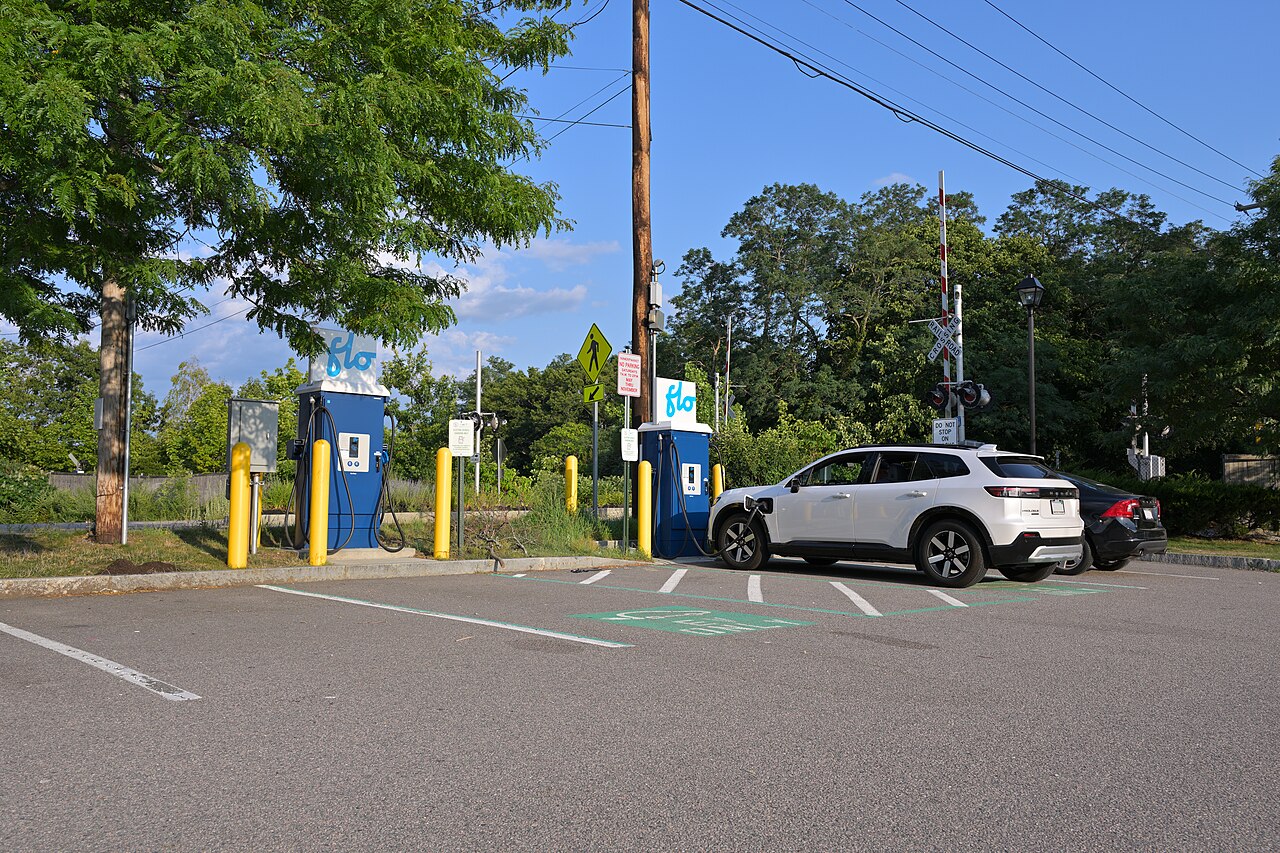
Image credit: “Flo EV fast charging station at Hingham Depot August 2026” by 4300streetcar, CC BY 4.0, via Wikimedia Commons.

About the author: Lifei Zhou
Model Y owner since 2022Ontario STO registered apprentice · 310SWorks on Porsche, Mercedes, BMW, Audi weeklyHundreds of readers referred (est.)
Lifei is a Tesla owner based in Canada, writing practical, fact-checked Tesla guides for US and Canadian drivers — buying, ownership, insurance, charging, and TSLA investing, all from first-hand experience.