
Does Tesla Have CarPlay? Tesla Infotainment, Streaming & Screen Guide 2026 (US & Canada)
Does Tesla Have CarPlay? Tesla Infotainment, Streaming & Screen Guide 2026 (US & Canada)

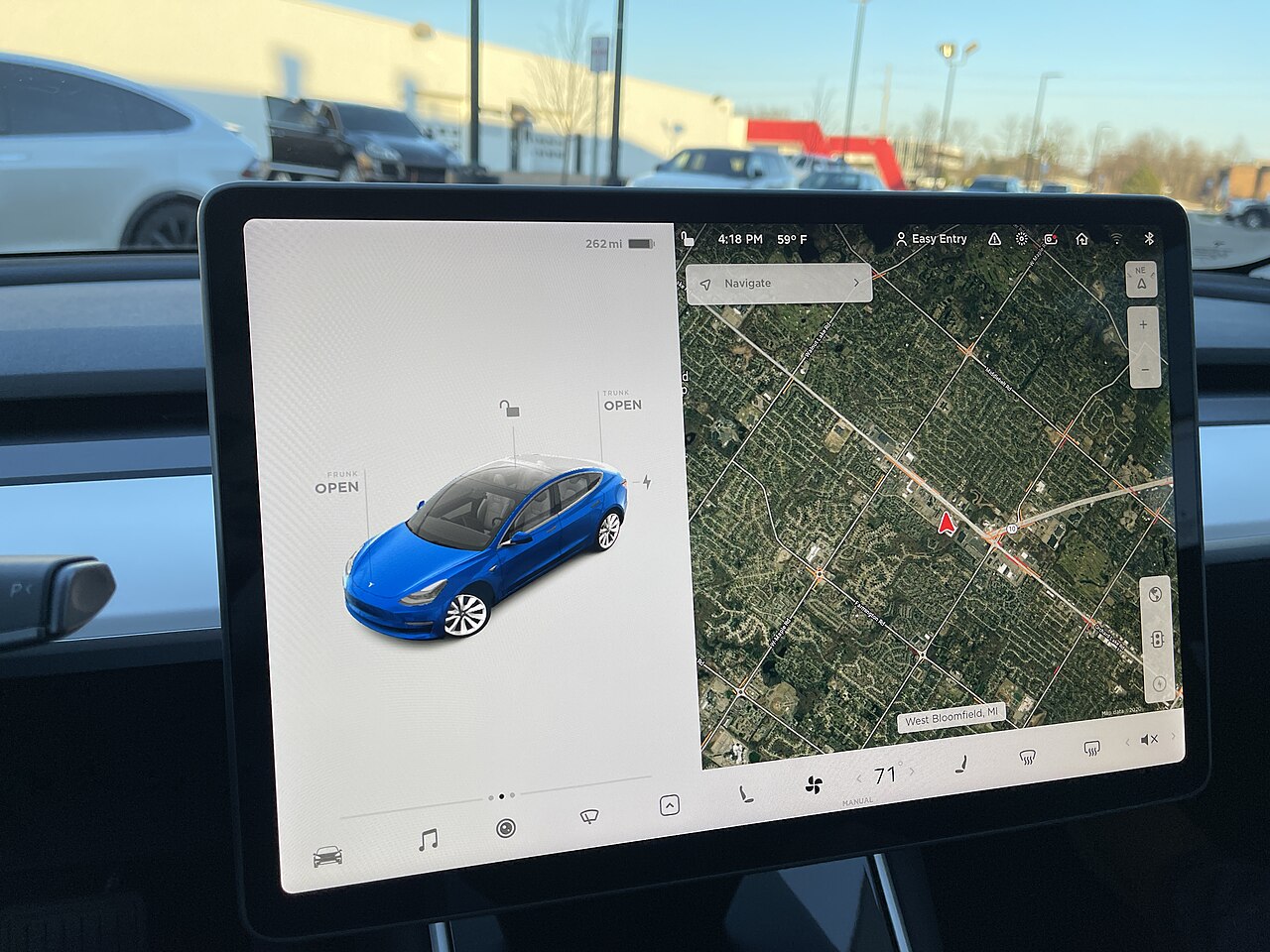
If you’re coming to Tesla from a “normal” car, the first thing you’ll reach for is Apple CarPlay or Android Auto — and the first thing you’ll notice is that neither one is there. Tesla has famously refused to support phone-mirroring for over a decade, betting instead on its own big-screen operating system. So does that mean you’re stuck? Not at all. This 2026 guide explains exactly what Tesla’s infotainment can and can’t do, whether official CarPlay is finally coming, which aftermarket workarounds are worth your money, and how to get the most out of that giant touchscreen — for both US and Canadian owners.
Disclosure: some links are affiliate/referral links. If you buy or order through them we may earn a commission or referral perk at no extra cost to you. See our disclosure page.
📋 Contents
- Does Tesla Have Apple CarPlay or Android Auto? The 2026 Short Answer
- Why Tesla Left CarPlay Out for So Long
- What Tesla’s Built-In Infotainment Actually Does Well
- Streaming, Games & Tesla Theater: Your Entertainment Options
- Aftermarket CarPlay for Tesla: What Really Works (and What Doesn’t)
- Do You Need Premium Connectivity?
- Screen Tips & Accessories Worth Buying
- Buying a Tesla? A Quick Word on the Screen-First Experience
- Frequently Asked Questions
- The Bottom Line
Does Tesla Have Apple CarPlay or Android Auto? The 2026 Short Answer
No. As of 2026, no Tesla — Model 3, Model Y, Cybertruck, or the now-discontinued Model S and Model X — has native Apple CarPlay or Android Auto. Every function you’d normally hand off to your phone (navigation, music, messages, calls) instead runs inside Tesla’s own software on the central screen.
The bigger news: after years of saying “never,” Tesla has reversed course. Multiple 2026 reports — including reporting relayed by 9to5Mac citing Bloomberg’s Mark Gurman — say Tesla is developing a wireless, “windowed” version of CarPlay. Rather than taking over the whole display like it does in other cars, CarPlay would appear inside a resizable window while Tesla’s own interface keeps handling climate, Autopilot/FSD visualizations and trip planning around it.
The catch: as of this writing it still hasn’t shipped to owners. Tesla reportedly hit a handful of technical hurdles — mostly around coordinating navigation between Apple’s CarPlay and Tesla’s built-in routing — and asked Apple to help resolve them. There is no confirmed public release date, and it’s expected to be standard wireless CarPlay, not the fancier CarPlay Ultra. So if you’re buying a Tesla today, plan around the system it has now, and treat CarPlay as a possible free over-the-air bonus later, not a guarantee.
Why Tesla Left CarPlay Out for So Long
This isn’t an oversight — it’s strategy. Tesla’s touchscreen is the gateway to features the company sells and updates over the air: Full Self-Driving (Supervised), Premium Connectivity, video streaming, and the constant stream of software updates that add features to cars already on the road. Handing the whole screen to Apple or Google would undercut that ecosystem.
There’s also a design argument. Because Tesla controls the hardware and software together, its maps show real-time Supercharger availability, automatically plan charging stops on long trips, and preheat the battery before you arrive at a fast charger. A mirrored phone app can’t reach into the car’s battery management the way native software can. If you want a deeper look at how the software layer ties into driving features, see our Tesla FSD guide and our Tesla app guide. The trade-off is real, though: you’re locked into Tesla’s way of doing things, and if you love a specific navigation or podcast app, you’ll miss it.
What Tesla’s Built-In Infotainment Actually Does Well
Before you mourn CarPlay, it helps to know how much the native system already covers. On any current Tesla you get:
- Navigation with live charging: Google-based maps with real-time traffic, automatic Supercharger routing, and battery preconditioning on the way to fast chargers.
- Voice commands: Press the right scroll wheel and say “Navigate to,” “Call Mom,” “Play [song],” or even “I’m cold” to bump the temperature. The 2026.20 software update also added Tesla’s “Hey Grok” AI voice assistant on supported cars — availability varies by region and software version.
- Phone as key + Bluetooth: Calls, texts and contacts sync over Bluetooth, and your phone doubles as the car key.
- Music streaming: Spotify, Apple Music, TIDAL, TuneIn and (in supported regions) Amazon Music stream directly — no phone tether needed once you’re signed in.
- Massive screen real estate: Maps, media and the reversing camera can share the display at once.
In day-to-day use, most owners find they simply don’t reach for CarPlay. Sign into your streaming accounts once, connect Bluetooth for calls and texts, and the phone stays in your pocket. The gaps show up in specifics — a niche navigation app, Waze’s crowd-sourced alerts, or reading long text threads on-screen — not in the basics.
Streaming, Games & Tesla Theater: Your Entertainment Options
Where Tesla genuinely beats a mirrored phone is parked entertainment. Tesla Theater turns the screen into a TV when you’re stopped and in Park, and the built-in Tesla Arcade adds games. Here’s what’s available in 2026:
| Category | Apps & Services (2026) | When It Works |
|---|---|---|
| Video (Tesla Theater) | Netflix, YouTube, Disney+, Hulu, Twitch, Max, and a growing list — exact lineup varies by region and software version | Parked, in Park only |
| Music | Spotify, Apple Music, TIDAL, TuneIn, Amazon Music (region-dependent) | Anytime, including while driving |
| Games (Tesla Arcade) | Casual titles plus select bigger games; some support a USB controller | Parked only |
| Web browser | Full browser for any site (this is also how some workarounds run) | Anytime, but designed for parked use |
| Podcasts & audio | Native podcast app; anything else via Bluetooth from your phone | Anytime |
Video and gaming require the car to be parked — they lock out the moment you shift into Drive, which is exactly what you want for safety. Streaming video over cellular also generally requires Premium Connectivity (more on that below), though anything running over your home or free Wi-Fi is fine. Rear passengers on Model S/X and newer Model 3/Y with a second screen can watch independently.
Aftermarket CarPlay for Tesla: What Really Works (and What Doesn’t)
Here’s where a lot of buyers get misled. In most cars, you plug a wireless CarPlay dongle into a USB port and it hijacks the factory head unit. Teslas don’t have a video input that accepts that kind of signal, so the classic plug-and-play adapters that work in a Honda or Toyota simply won’t display in a Tesla.
The workaround that does exist — sold under brands like CarlinKit’s Tesla-specific “T2C” box — is clever but compromised. Instead of feeding the screen directly, the box creates its own Wi-Fi hotspot, and you open the car’s web browser to view a CarPlay-style interface streamed from the device. It works, but real-world owners on forums like Tesla Motors Club consistently report the same drawbacks:
- It runs inside the browser, so there’s noticeable lag and lower resolution than real CarPlay.
- Connections drop and often need a power-cycle to reconnect.
- It ties up the browser and can conflict with the native UI.
- It’s a genuinely useful bridge for map apps and messaging, but it is not the seamless experience you get in other cars.
If you still want to try one, you can compare current options and reviews for a Tesla wireless CarPlay adapter on Amazon US (Canadian shoppers: the equivalent Tesla CarPlay adapter on Amazon CA). Our honest take for 2026: if official windowed CarPlay is only months away as an over-the-air update, many owners will be happier waiting for the free, native version than paying for a laggy browser workaround now.
Do You Need Premium Connectivity?
Tesla splits its connected features into Standard Connectivity (free) and Premium Connectivity (a monthly or annual subscription — US$9.99/month or US$99/year in the US, CA$13.99/month or CA$140/year in Canada — often bundled free for the first period on new cars). The difference matters most for the infotainment features people love. Here’s the 2026 breakdown:
| Feature | Standard (Free) | Premium Connectivity |
|---|---|---|
| Music streaming over cellular | Limited / Wi-Fi | Yes |
| Video streaming (Theater) over cellular | Wi-Fi only | Yes |
| Live traffic + satellite/topo maps | No | Yes |
| Basic maps & navigation | Yes | Yes |
| Sentry Mode live view via app | Wi-Fi only | Yes (over cellular) |
Bottom line: if you mainly stream music on a phone plan and rely on home Wi-Fi for updates, Standard Connectivity is livable. But if you want live traffic, in-car video, and cellular access to features like Sentry live-view, Premium is worth the modest monthly cost. For more on Sentry and dashcam features, see our Tesla Sentry Mode & dashcam guide.
Screen Tips & Accessories Worth Buying
A few small upgrades make the touchscreen-centric experience much nicer:
- A quality USB drive for Sentry/Dashcam and music: Tesla records to a USB stick, and a fast, high-endurance drive prevents dropped clips. Browse high-endurance USB drives on Amazon US.
- A matte screen protector: Cuts glare and fingerprints on that big glossy display. The Spigen matte screen protector is the one I run on my own car.
- A USB game controller: If you use Tesla Arcade while charging, a wired or 2.4GHz controller beats the touchscreen. See controllers on Amazon US.
One habit worth building: keep your car on your home Wi-Fi so software updates — which is how new streaming apps and (eventually) CarPlay will arrive — download reliably overnight.
Buying a Tesla? A Quick Word on the Screen-First Experience
If the lack of CarPlay is your only hesitation, test-drive first. Most people adapt within a week, and the native maps + voice combo covers 90% of what CarPlay does. If you do decide to order, note that placing your order through a Tesla referral link currently gets you 3 months of free Full Self-Driving (Supervised) — a nice way to sample the software suite that makes Tesla’s screen so central in the first place. New to the lineup? Our Model Y USA guide and the full US Tesla section walk through trims and pricing. When you’re ready, you can order through the same referral link for the free FSD trial.
Frequently Asked Questions
Does any Tesla have Apple CarPlay in 2026?
No Tesla ships with native CarPlay yet. Multiple credible reports say Tesla is developing a wireless, windowed version to arrive via an over-the-air update, but as of 2026 it has not reached customers and has no confirmed release date.
Will older Teslas get CarPlay too?
Tesla hasn’t published a compatibility list, but the feature is expected to arrive as a software update, which historically reaches a wide range of existing cars. There’s no guarantee the very oldest infotainment computers will qualify. Treat it as likely-but-unconfirmed for now.
Can I add CarPlay to my Tesla today with an adapter?
Sort of. Tesla-specific boxes (like CarlinKit’s T2C) stream a CarPlay-style screen through the car’s web browser over their own Wi-Fi hotspot. It works but is laggy, lower-resolution, and prone to disconnects. It is not the seamless CarPlay you’d get in other cars.
Does Tesla have Android Auto?
No, and there’s been no announcement about native Android Auto. Android users get the same options as everyone else: Bluetooth for calls/texts, built-in streaming apps, and the same browser-based aftermarket workarounds.
Can I watch Netflix or YouTube while driving?
No. Tesla Theater video and Tesla Arcade games only work when the car is parked and in Park; they lock out as soon as you shift into Drive. Music and navigation work while driving.
Do I need Premium Connectivity to stream?
For streaming over cellular (video, and live-traffic maps) yes. Over home or free Wi-Fi, and for basic music on some setups, Standard Connectivity is enough. Premium runs US$9.99 a month in the US and CA$13.99 a month in Canada.
The Bottom Line
- No Tesla has native Apple CarPlay or Android Auto in 2026 — but an official wireless, windowed CarPlay is in development for a future over-the-air update.
- Tesla’s built-in system already covers navigation, voice, music streaming, calls and texts; most owners stop missing CarPlay within a week.
- Tesla Theater (parked video) and Tesla Arcade are genuine advantages over a mirrored phone.
- Aftermarket “CarPlay” boxes run through the web browser and are laggy — a stopgap, not a fix. Waiting for the free native version is often the smarter play.
- Premium Connectivity is worth it if you want cellular video, live traffic and Sentry live-view; accessories like a high-endurance USB drive and matte screen protector round out the experience.
Information current as of July 2026. Prices, subscription costs and feature availability change with Tesla software updates and by region — verify current details on Tesla’s official site before purchasing. This article is for general information only and is not affiliated with or endorsed by Tesla, Inc. Some links are affiliate/referral links; see our disclosure page. Image credit: Tesla Model 3 touchscreen by SirAsdof, licensed CC BY-SA 4.0, via Wikimedia Commons.

About the author: Lifei Zhou
Lifei is a Tesla owner based in Canada, writing practical, fact-checked Tesla guides for US and Canadian drivers — buying, ownership, insurance, charging, and TSLA investing, all from first-hand experience.
