
Tesla Screen Protector Guide 2026: Matte vs. Clear, Sizes by Model & How to Install
Tesla Screen Protector Guide 2026: Matte vs. Clear, Sizes by Model & How to Install

In one sentence
Which Tesla screen protector fits your car? 15", 15.4" or 16" sizes by model, matte vs. clear, tempered glass vs. film, bubble-free install and Tesla's cleaning rules.
The center touchscreen is your Tesla’s dashboard, gauge cluster, climate panel and entertainment system all at once, and you’ll touch it hundreds of times a week. On a sunny afternoon that big sheet of glossy glass also turns into a mirror, and after a week of pizza-fingered kids and winter gloves it’s covered in smudges. A screen protector is one of the cheapest upgrades that makes a daily difference. It’s also one of the easiest to get wrong, because Tesla has quietly shipped at least four different screen sizes in the Model 3 and Model Y since 2017. This guide covers which size you actually have, whether matte or clear is right for your commute, how to install one without dust bubbles, and how to clean the screen the way Tesla recommends.
Disclosure: some links are affiliate/referral links. If you buy through them, we may earn a commission or referral credit at no extra cost to you. See our disclosure page.
📋 Contents
- Do You Actually Need a Tesla Screen Protector?
- Which Screen Size Does Your Tesla Have? (Check Before You Buy)
- Matte vs. Crystal Clear: Which Finish Should You Pick?
- Tempered Glass vs. Film, and What the Specs Mean
- Best Tesla Screen Protectors by Model
- How to Install a Tesla Screen Protector Without Bubbles or Dust
- How to Clean a Tesla Touchscreen (With or Without a Protector)
- Protect the Screen Before You Even Get the Car
- Frequently Asked Questions
- The Bottom Line
Do You Actually Need a Tesla Screen Protector?
Tesla’s displays are tough, and plenty of owners go years without one. Still, there are three good reasons to add a protector, and one of them matters more in North America than people expect.
- Glare. The screen is mounted upright in the middle of the dash, right under a big windshield and, on most trims, a full glass roof. Low winter sun in Calgary or Minneapolis and high summer sun in Phoenix both bounce straight off it. Drivers who switch to a matte protector usually say this is the biggest change: the map stays readable instead of turning into a reflection of your own sunglasses.
- Fingerprints. Nearly every control lives on the screen, so it gets greasy fast. A matte finish hides smudges much better than bare glass.
- Scratches and resale. Rings, keys, a phone slid across the console, a dog’s claw from the back seat. A $35–$55 piece of tempered glass is much cheaper than a scratched display at trade-in time. When a buyer or appraiser sits in the car, the screen is the first thing they look at.
If you mostly drive at night, park in a garage and hate anything that changes the look of the screen, you can skip it. For most daily drivers, especially families and anyone who drives into the sun on the way to work, it’s worth the money.
Which Screen Size Does Your Tesla Have? (Check Before You Buy)
This is where most people order the wrong part. Tesla doesn’t change screen sizes with the model year. It changes them mid-production and by trim. Here’s the 2026 picture for North American cars, cross-checked against Tesla’s spec pages for the Model 3 and Model Y and independent reporting on the mid-2026 screen change.
| Vehicle | Center screen | Rear screen | Protector to look for |
|---|---|---|---|
| Model 3 (2017–2023) | 15″ | None | “Model 3 2017–2023″ 15” |
| Model Y (2020 through early 2025, pre-Juniper) | 15″ | None | Same 15″ part as the older Model 3 |
| Model 3 “Highland” (2024+) | 15.4″ | 8″ (not on Standard trim) | 15.4″ + 8″ kit |
| Model Y “Juniper” (2025 to mid-2026 builds) | 15.4″ (16″ on Performance) | 8″ (not on Standard trims) | 15.4″ + 8″ kit, or 16″ for Performance |
| Model Y ordered after early June 2026 (all trims, US & Canada) | 16″ QHD | 8″ on Premium/Performance | 16″ + 8″ kit |
| Model S / Model X (2021+) | 17″ landscape | Yes | “Model S/X 2021+” kit |
| Cybertruck | 18.5″ | 9.4″ | Cybertruck-specific kit |
Two traps to watch for:
- 2025–2026 Model Y owners: In early June 2026 Tesla moved every new Model Y in the US and Canada, including the base RWD and AWD, from the 15.4-inch screen to a 16-inch QHD panel. A “2026 Model Y” can have either size depending on its build date. Inventory cars and early-2026 deliveries often have the 15.4-inch screen.
- Model 3 owners: Reports and code findings point to the Model 3 getting the same 16-inch QHD screen, rolling out in other markets first. Canadian Model 3s are Shanghai-built, so a late-2026 Canadian car could arrive with the new panel. Don’t go by model year. Measure.
The 30-second tape-measure test
The 15.4-inch and 16-inch screens are close in diagonal, but they have different shapes. The 16-inch panel is 16:9, so it’s wider and a touch shorter. The 15.4-inch panel is 16:10. Measure only the lit display area, not the black border:
- Active area about 13.9–14 in wide → 16-inch screen.
- Active area about 13 in wide and a little taller → 15.4-inch screen.
You can also check your order details in the Tesla app, the window sticker, or the “Specs” tab in your Tesla account. If you haven’t taken delivery yet, wait until the car arrives and measure before you order. It’s part of the five-minute interior check in our Tesla delivery inspection checklist anyway.
Matte vs. Crystal Clear: Which Finish Should You Pick?
This is the real decision, and it depends on your driving, not on which one looks better in a product photo.
| Matte (anti-glare) | Crystal clear (glossy) | |
|---|---|---|
| Glare in direct sun | Much less. Reflections become a soft haze | Same as the bare screen |
| Fingerprints | Hides them well | Shows them (an oleophobic coating helps them wipe off) |
| Sharpness & color | Slightly softer, with a faint “sparkle” on white backgrounds up close | Looks like factory glass |
| Touch feel | Silky, a bit of texture | Smooth glass |
| Best for | Daily commuters, sunny states, snow glare, families | Garage-kept cars, night drivers, Theater mode fans |
Our take: for the front screen, most people should go matte. Glare is a safety issue, not just an annoyance. When the nav map, camera view or Autopilot visualization washes out, you spend longer looking at the screen. Snow glare in Canadian winters is at least as bad as the desert sun. The 16-inch QHD screen on new Model Ys is sharp enough that the small softening from matte glass is hard to notice at arm’s length.
Pick clear if you mostly use the screen for video while parked. If your Tesla turns into a movie theater at the campsite (lots of Canadian owners stream in Camp Mode over a Starlink Mini, whose referral link works for Canadian orders only), the extra punch of clear glass is noticeable. Some owners compromise: matte on the front screen, clear on the rear screen, which gets far less glare and fewer greasy fingers from adults.
Tempered Glass vs. Film, and What the Specs Mean
You’ll see two main types: 9H tempered glass (about 0.3–0.5 mm thick) and thin PET or TPU film. For a Tesla center screen we recommend glass, for three reasons:
- It feels right. Swiping the map on glass feels like the original screen. Film has a slightly rubbery drag.
- It’s forgiving to install. Glass is rigid, so it doesn’t stretch or trap long wrinkles, and most good kits include an alignment frame.
- It takes the hit. If something hard strikes the screen, the protector cracks instead of the display. Replacing a $40 protector is a Saturday chore. A touchscreen repair is a service appointment.
A few spec terms are worth decoding. “9H” is a pencil-hardness rating. It means the glass resists everyday scratches, not that it’s unbreakable. “Oleophobic coating” is what makes fingerprints wipe off easily, and it’s the difference between a good clear protector and a cheap one. An “auto-alignment frame” or “tray” is a plastic jig that sits on the screen’s bezel so the glass drops into place square. Don’t buy a large Tesla protector without one.
Best Tesla Screen Protectors by Model
We lean on JOWUA for most models. They make Tesla-specific tempered glass for every current North American model, each kit comes with an alignment frame and a cleaning kit, and they ship free to both the US and Canada above a threshold with duties included. That last point matters for Canadians, who otherwise get hit with brokerage fees at the door. Readers get 5% off with code TSLNA.
- Model 3 Highland (2024+) and Model Y (2025+), 15.4″ or 16″: The JOWUA Tempered Glass Screen Protector 15.4″/16″ (use code TSLNA for 5% off) is our main pick. Choose the variant that matches your tape-measure result. The 15.4-inch version comes in matte, and the 16-inch version comes in matte or crystal clear. Each kit includes a second pane for the 8-inch rear screen. If you have a Standard trim with no rear screen, just keep the spare. Expect roughly $40 USD.
- Model 3 (2017–2023) and pre-Juniper Model Y, 15″: JOWUA’s 15″ Model 3/Y tempered glass (code TSLNA for 5% off) is crystal clear only. If you want matte on an older car, the Spigen GlasTR EZ Fit matte for Model 3 2017–23 / Model Y 2020–25 is the long-running favorite on Amazon US, usually in the $30–$45 range. Double-check it’s the 15-inch listing, not the 15.4-inch one.
- Model S / Model X (2021+): JOWUA Model S/X matte tempered glass (code TSLNA for 5% off) covers the front screen and includes a second pane. Tesla has ended S/X production, but these cars will be on the road for a decade, and a clean screen helps a lot when you sell one privately.
- Cybertruck: The JOWUA Cybertruck screen protector (code TSLNA for 5% off) covers both the 18.5-inch front and 9.4-inch rear screens, in matte or clear. It’s the priciest of the group, in the mid-$50s USD, because the glass is so large. For the rest of the truck, see our Cybertruck accessories guide.
While you’re sorting out the screen area on a Highland or Juniper, the space under the display is the other spot owners fix. JOWUA’s Under Screen Invisible Station (code TSLNA for 5% off) mounts a hidden phone charger and ports behind the screen. It’s a bigger purchase, in the $130 range, and entirely optional. For a full prioritized list, our new owner shopping guide ranks what’s worth buying in the first month.
How to Install a Tesla Screen Protector Without Bubbles or Dust
Budget 15 minutes. Most failed installs come from dust, not from the glass itself.
- Pick the right spot. Park in a closed garage with the doors shut and the HVAC off. Wind and cabin fans spread dust. Some owners run a hot shower in a nearby bathroom first to settle airborne dust, but a calm garage is usually enough.
- Turn on Screen Clean Mode. Tap Controls > Display > Screen Clean Mode. The screen goes dark so every speck shows up, and your wiping won’t change settings. Press and hold to exit afterward.
- Clean the bare screen. Use the kit’s wipe and dry cloth. Then use the dust-removal sticker to lift anything left, paying special attention to the edges.
- Seat the alignment frame on the screen bezel so it sits flush and square.
- Peel the backing, drop the glass into the frame and press once in the center. The adhesive spreads outward on its own. Don’t slide it around.
- Push out small bubbles toward the nearest edge with the included card. Tiny bubbles with no dust under them usually disappear within 24–48 hours.
- Trapped dust speck? Lift that corner with a piece of tape, dab the speck with a dust sticker and lower the glass again. Doing it right away beats living with it.
- Repeat for the rear screen if you have one. Put the rear seats in a comfortable position so you’re not working at an angle.
A good tempered-glass protector doesn’t affect touch response. If a corner of the screen stops registering taps after install, the glass isn’t seated on that edge. Press it down firmly or reseat it.
How to Clean a Tesla Touchscreen (With or Without a Protector)
Tesla’s own owner’s manuals are specific here, and they apply whether you add a protector or not. According to the Model Y Owner’s Manual cleaning section (the Cybertruck manual says the same thing):
- Use a soft, lint-free cloth made for monitors and displays.
- Don’t use glass cleaner or alcohol-based gel products such as hand sanitizer on the screen.
- Don’t use wet wipes or a dry, statically charged cloth. Tesla specifically calls out a recently washed microfiber.
- Turn on Screen Clean Mode first so you don’t change settings while you wipe.
That last cloth tip surprises people. A freshly laundered microfiber can build static and pull dust right back onto the screen. Keep one dedicated display cloth in the door pocket, wash it with no fabric softener, and let it relax for a day before using it. JOWUA’s microfiber cleaning cloth 3-pack (code TSLNA for 5% off) is an easy add-on to a screen protector order, so you can keep one for the screen, one for the piano-black trim and one for the camera lenses.
Hand sanitizer is the sneaky one. If you put it on right before driving, your fingertips carry alcohol gel straight onto the screen. Let it dry fully first.
Protect the Screen Before You Even Get the Car
If you’re still shopping, it’s easiest to order the protector as soon as you know your build, then install it on delivery day before the first fingerprint. It’s also a good time to sort out the other first-week items, like floor liners, a console organizer and a phone mount. Our Tesla new owner accessories list covers those.
One more money tip for buyers. If you order a new Model 3, Model Y or Cybertruck through a Tesla referral link, you get 3 months of free FSD (Supervised); it generally can’t be combined with the new-car FSD trial, and Tesla confirms the final perk on your order. That’s worth about $297 at the current $99/month rate, and details are on Tesla’s referral program page. It doesn’t change the car’s price.
JOWUA Tesla accessories: 5% off for tslna readers. Screen protectors, phone mounts, console organizers and more for Model 3, Model Y, Model S, Model X and Cybertruck. Use code TSLNA at checkout for 5% off at jowua-life.com. Orders over US$130 ship free, arrive in about 5–7 days via DHL Express, and include duties and taxes, so there are no surprise brokerage fees in Canada.
Frequently Asked Questions
Does a screen protector affect Tesla touchscreen sensitivity?
A properly seated 9H tempered-glass protector (around 0.3–0.5 mm thick) doesn’t noticeably change touch response. If one edge seems dead after installing, the glass isn’t fully bonded on that side. Press it down or reseat it.
Will a screen protector void my Tesla warranty?
No. A stick-on protector doesn’t connect to anything and can be peeled off cleanly. If your screen ever needs service, remove the protector before the appointment so the technician can inspect the display directly.
Is the 2026 Model Y screen 15.4 or 16 inches?
It depends on the build date. Tesla moved all new Model Y trims in the US and Canada to a 16-inch QHD screen in early June 2026. Performance models already had it. Earlier 2026 builds and many inventory cars have the 15.4-inch screen. Measure the lit area: about 14 inches wide means 16-inch, and about 13 inches wide means 15.4-inch.
Matte or clear, which is better for a Tesla?
Matte is better for most daily drivers because it cuts glare from the windshield and glass roof and hides fingerprints. Clear keeps the display at its sharpest and suits garage-kept cars or owners who watch a lot of video while parked.
Can I use Windex or alcohol wipes on my Tesla screen?
Tesla’s owner’s manual says not to use glass cleaners, alcohol-based gels such as hand sanitizer, or wet wipes on the touchscreen. Use a soft, lint-free display cloth with Screen Clean Mode turned on.
Does a 15-inch protector fit the 15.4-inch Highland or Juniper screen?
No. The 2024+ Model 3 and 2025+ Model Y screens have a different size and bezel than the 2017–2023 Model 3 and pre-Juniper Model Y. Buy a protector listed for your exact model and screen size.
The Bottom Line
- Measure before you buy. Tesla has shipped 15″, 15.4″ and 16″ screens in the Model 3 and Model Y, and a 2026 Model Y can have either of the last two.
- Go matte on the front screen if you drive in daylight. It cuts glare and hides fingerprints. Choose clear if you mostly stream while parked.
- Choose 9H tempered glass with an alignment frame over film. It feels like the original screen and takes the hit instead of the display.
- Our main pick is the JOWUA 15.4″/16″ tempered glass for Highland and Juniper (code TSLNA for 5% off). Older 15″ cars can use JOWUA clear or Spigen matte.
- Clean the screen with a dry, lint-free display cloth in Screen Clean Mode. No glass cleaner, sanitizer or wet wipes.
- Still shopping? Ordering through a Tesla referral link adds 3 months of free FSD (Supervised). Browse more gear in our Tesla Accessories section.
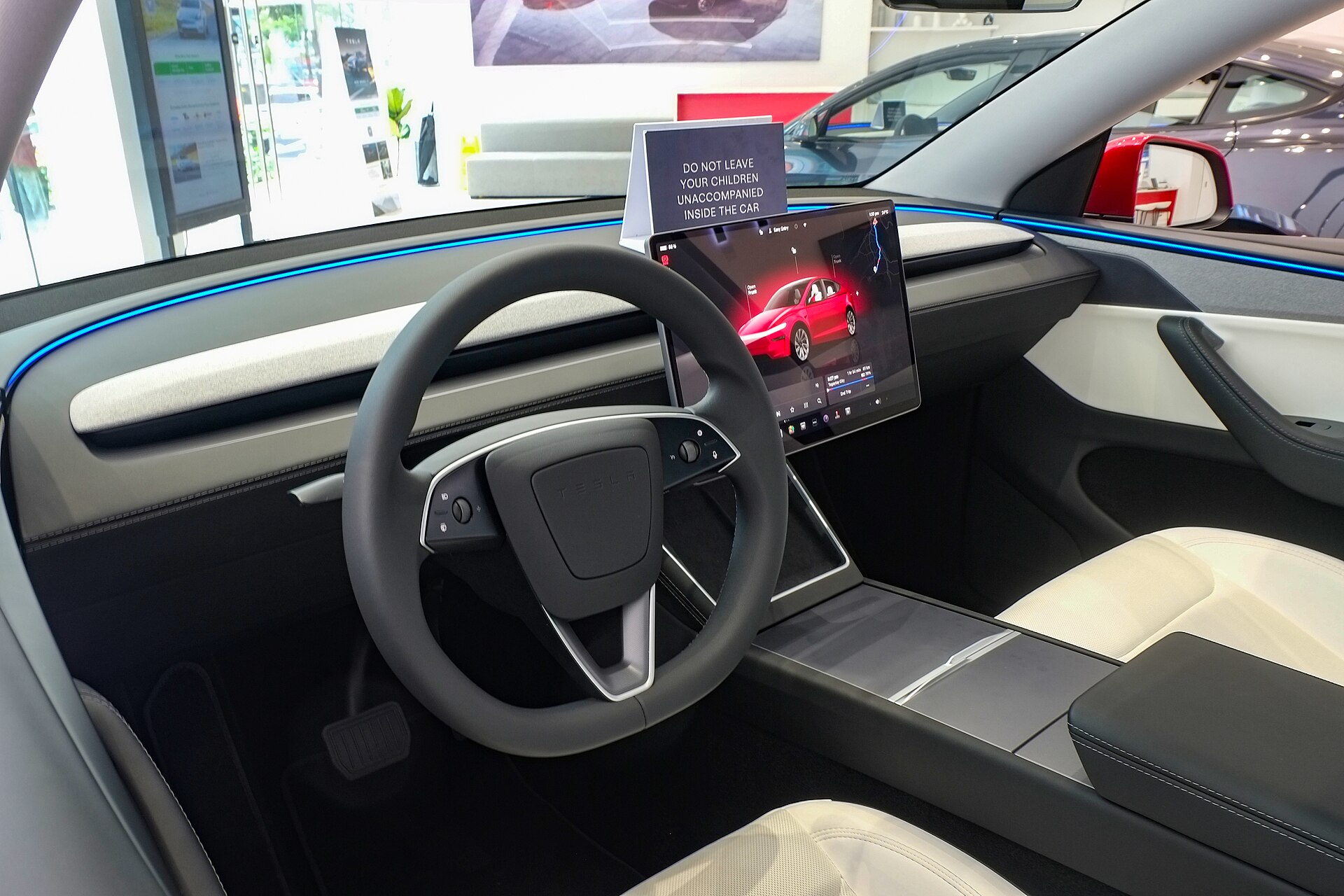
Image credit: “Tesla Model Y 2025 interior” by Ethan Llamas, licensed under CC BY-SA 4.0, via Wikimedia Commons.
About the author: Lifei Zhou
Model Y owner since 2022Ontario STO registered apprentice · 310SWorks on Porsche, Mercedes, BMW, Audi weeklyHundreds of readers referred (est.)
Lifei is a Tesla owner based in Canada, writing practical, fact-checked Tesla guides for US and Canadian drivers — buying, ownership, insurance, charging, and TSLA investing, all from first-hand experience.