
Starlink Mini Review: 131 Mbps Tested in Toronto (2026 Canada Pricing)
Starlink Mini Review: 131 Mbps Tested in Toronto (2026 Canada Pricing)

Let me start with the part most reviews save for the end: I did not buy Starlink to replace my home internet.
I live in a high-rise north of downtown Toronto. My home connection is Primus fibre bought through Costco — 500 Mbps for C$49.66 a month, tax included. It is cheap, it is fast, and it never drops. On pure city-home value, Starlink does not come close, and I will show you the numbers rather than just say it.
So why buy one? Because I bought the smallest, most portable dish Starlink makes: the Starlink Mini. It is smaller than a laptop, it fits in a backpack, and it works on both sides of the Canada–US border. The part that sold me was the idea of putting it in my Tesla so the internet travels with the car.
This is a first-hand review: unboxing, a no-drill balcony setup, a real speed test in Toronto, current Canadian pricing, and an honest look at what the Mini does and does not do once you put it in a car. If you get to the end and decide to order, there is a small perk for Canadian readers: sign up through my referral link and Starlink pays you CA$140, as cash or service credit.
Disclosure: this article contains Starlink and Tesla referral links. If you sign up through them I may receive a small referral reward at no extra cost to you. See our disclosure page. Prices are approximate and change often — always confirm on the official site.
Key takeaways
- Starlink Mini tested on a Toronto high-rise balcony: 131 Mbps down, 12 Mbps up, 30 ms latency, a normal urban result.
- If you already have 500 Mbps fibre for C$49.66 a month, Starlink Residential 100 costs almost twice as much for a fifth of the speed. It is not a home-internet upgrade.
- The Mini earns its keep on the move: 20 to 40 W, powered from a Tesla’s 12 V socket with a high-wattage USB-C adapter, online at the campsite, across the border and in a winter parking lot.
- Canadian plans: Residential from about C$75, Roam from about C$75, pausable month to month with Standby at about C$15, so the yearly spend stays sensible.
- Canadian readers who order through my Starlink referral link get CA$140 back (cash or credit) after two billing cycles; the link is in the offer box below.
📋 Contents
- The short version: who should buy a Starlink Mini, and who shouldn’t
- How I tested this
- I already have cheap fibre — is Starlink still worth installing?
- Why I chose the Starlink Mini over the standard dish
- How Starlink actually works, in plain English
- What’s in the Starlink Mini box
- Balcony setup: no drilling, no roof, about 20 minutes
- Speed test: 131 / 12 / 30 ms on a Toronto balcony
- The main event: putting the Mini in a Tesla
- Does Starlink survive a Canadian winter?
- What it costs me over a year
- Five things I’d tell a first-time buyer
- Frequently Asked Questions
- The bottom line
The short version: who should buy a Starlink Mini, and who shouldn’t
If you read nothing else, read this.
Worth it if you:
- road-trip, camp, or drive an RV, or cross between Canada and the US and need internet that follows you;
- live rurally or on the edge of town where fibre never arrived and the local provider charges whatever it likes;
- own a Tesla and treat it as a mobile living room and office;
- want a backup connection for the days your home internet dies.
Probably not worth it if you:
- already have cheap, fast fibre in the city and want Starlink to replace it (that is me — and no, it does not make sense);
- expect it to beat a wired connection on speed or price (it won’t);
- only have a balcony or yard hemmed in by trees, eaves, or a taller building — blocked sky means a blocked connection.
The one-line summary: Starlink does not sell speed and it does not sell value. It sells the certainty of being online where there is no ground network at all. Whether that is worth the money depends entirely on how many days a year you actually leave the city.
How I tested this
So you can judge how much my numbers apply to you:
- When and where: early September 2026, on the balcony of a high-rise apartment north of Toronto, high floor, almost no obstructions overhead.
- Hardware: a brand-new Starlink Mini kit, bought at full retail. Not a review unit from the manufacturer.
- Speed test: the built-in Speed Test in the Starlink mobile app, daytime, clear weather, device showing a healthy online status.
- Control group: my home Costco Primus fibre, 500 Mbps, C$49.66 a month including tax.
- Photos: the unboxing, the accessories, the balcony install and the app screenshots are all mine. No press images.
And the limits, so you don’t over-read the results: I tested one urban location, not the countryside, not a highway, not a week off-grid in northern Ontario. On the Tesla side I have finished the power setup and parked use; long-haul in-motion testing is still in progress and will get its own article. Below, anything I measured myself is labelled as tested; anything based on specs or official documentation is labelled as such.
I already have cheap fibre — is Starlink still worth installing?
A lot of people assume Canadian internet is expensive, therefore Starlink. My situation is the opposite. Put my fibre next to Starlink’s entry-level residential plan and the gap is obvious:
| Plan | Monthly (with tax) | Speed |
|---|---|---|
| Costco Primus fibre | about C$49.66 | 500 Mbps |
| Starlink Residential 100 | C$75 + tax ≈ C$84.75 | around 100 Mbps |
Starlink costs roughly twice as much and delivers about a fifth of the speed I already have. So the conclusion is blunt: if you have a stable, affordable wired connection at home, do not swap it out for a dish because the dish is cooler. In a city, fibre wins on both price and performance, and it isn’t close.
I put this near the top on purpose, because it talks a lot of people out of a bad purchase. Starlink is not trying to beat your fibre. Its value lives in one word — mobility — which is exactly why I chose the portable Mini.
Why I chose the Starlink Mini over the standard dish
Starlink sells several dishes. The Standard kit is bigger, expects a permanent mount, and is built to live at one address. The Mini is built to move. The trade-offs are clear:
| Starlink Mini | Standard dish | |
|---|---|---|
| Size and weight | smaller than a laptop, dish about 1.1 kg, whole kit fits a backpack | noticeably larger, wants a permanent mount |
| Router | Wi-Fi built into the dish, nothing extra to plug in | separate router in the box |
| Power draw | roughly 20–40 W in normal use, with short spikes at startup | higher; realistically wants household power |
| Peak speed | smaller antenna, so a slightly lower ceiling | higher, better for a busy household |
| Best for | road trips, camping, vehicles, border-hopping, pop-up offices | a rural home that needs a primary connection |
For me the low power draw is the whole ballgame. Twenty to forty watts means the Mini is not fussy about where its electricity comes from — a 12 V socket, a decent power bank, or a small portable power station will all keep it running. That is what makes putting it in a car realistic.
Portable hardware needs a portable plan: that’s Roam
Residential plans are tied to a service address, so they are useless the moment you drive away. To travel you want Roam, which is built around the dish following you rather than sitting on a roof. You can pause it month to month, so you are not paying full price in the months it stays in the closet, and coverage spans both Canada and the US (check the official coverage map and terms for your route). For someone who crosses the border regularly, that is close to purpose-built.
Here is roughly where Canadian pricing sits. It moves by postal code and changes often, so treat this as a starting point and confirm at checkout:
| Plan | Approx. monthly (CAD) | Typical speed | Who it suits |
|---|---|---|---|
| Residential 100 | about $75 | around 100 Mbps down | rural homes with no fibre |
| Residential 200 | about $115 | around 200 Mbps down | several people online at once |
| Residential Max | about $150 | 400+ Mbps | heavy users |
| Roam 100 GB | about $75 | portable, pausable | occasional trips and camping |
| Roam Unlimited | about $200 | unlimited, portable | long stretches on the road |
Judged as home internet, Roam is not cheap either. But it is not selling dollars per megabit. It is selling the highway rest stop, the lakeside campsite, the logging road, the border crossing — places where fibre doesn’t exist and cell service is a coin flip. That certainty is the product.
Canadian readers: order through a referral and get CA$140 back
Starlink’s referral program is simple. If you are in Canada and you sign up through an existing customer’s link, Starlink pays you CA$140 after two full billing cycles, as a service credit or cash; the referrer gets the same amount. Hardware and plan prices are exactly the same as ordering direct. Because the program requires both people to be in the same country and I am in Canada, the perk only applies to Canadian addresses. US readers should order directly from Starlink’s US site.
How Starlink actually works, in plain English
A minute of background explains why this thing works where nothing else does.
Older satellite internet uses satellites parked roughly 36,000 km up. Every packet travels most of the way to space and back, so latency is dreadful — fine for a weather download, hopeless for a video call. Starlink took the opposite approach: thousands of small satellites in low Earth orbit, only a few hundred kilometres overhead. Shorter trip, lower latency — in the 25–60 ms range, which is the same neighbourhood as ground broadband.
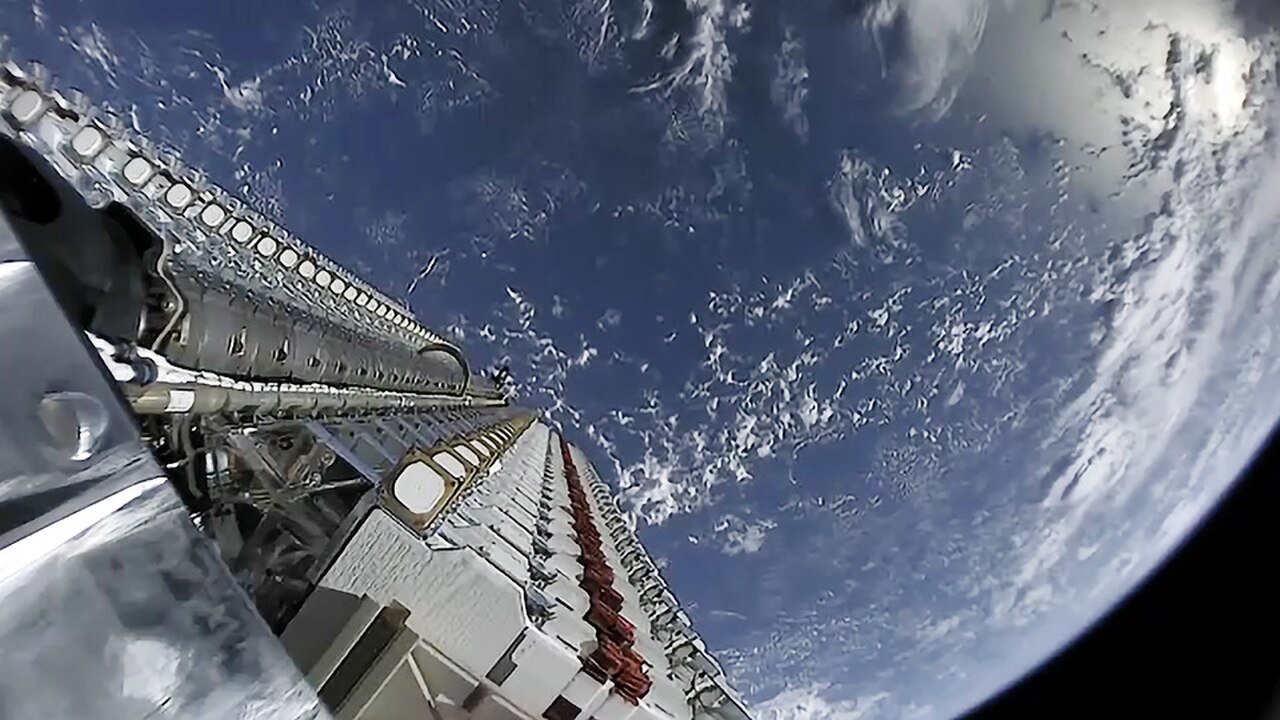
The catch is that low-orbit satellites move fast, crossing the sky in minutes, so your dish is constantly handed from one to the next. That gives Starlink two hard rules:
- The sky above the dish has to be open. Branches, eaves and taller buildings cause dropouts, and this is the number one reason people have a bad experience.
- Speed is shared. Satellites and ground stations are common resources, so the more subscribers under the same patch of sky, the thinner each slice. That is why cities are often slower than the countryside.
Keep those two rules in mind and my test numbers below will look completely normal.
What’s in the Starlink Mini box
It arrived a few days after ordering in a flat box with the minimalist styling Starlink is known for — the setup diagram is printed inside the lid, so there is no manual. Not much inside, but everything feels considered:
- The Mini dish: an off-white slab with a phased-array antenna that aims itself electronically. Wi-Fi is built in, so there is no separate router to find a home for.
- Kickstand: props the dish at an angle on the ground or a flat surface. Ideal for temporary placement.
- Cable: the proprietary power cable, generously long — enough to run from a balcony into the room.
- Power supply and paperwork: the usual brick plus a multilingual regulatory notice.
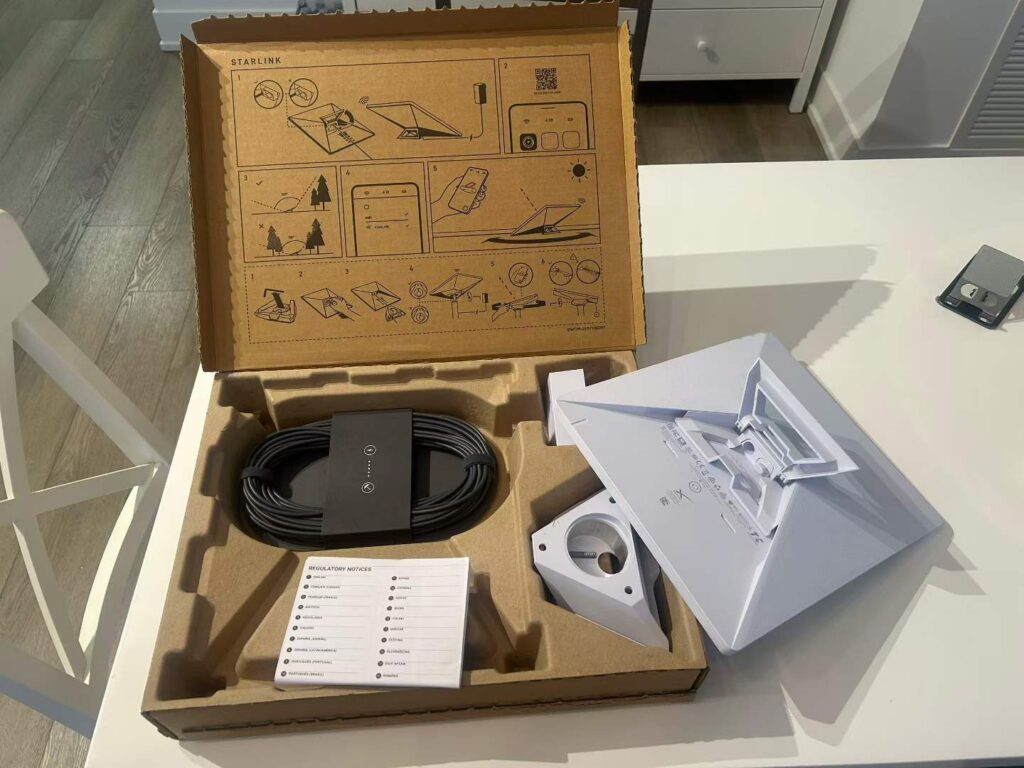
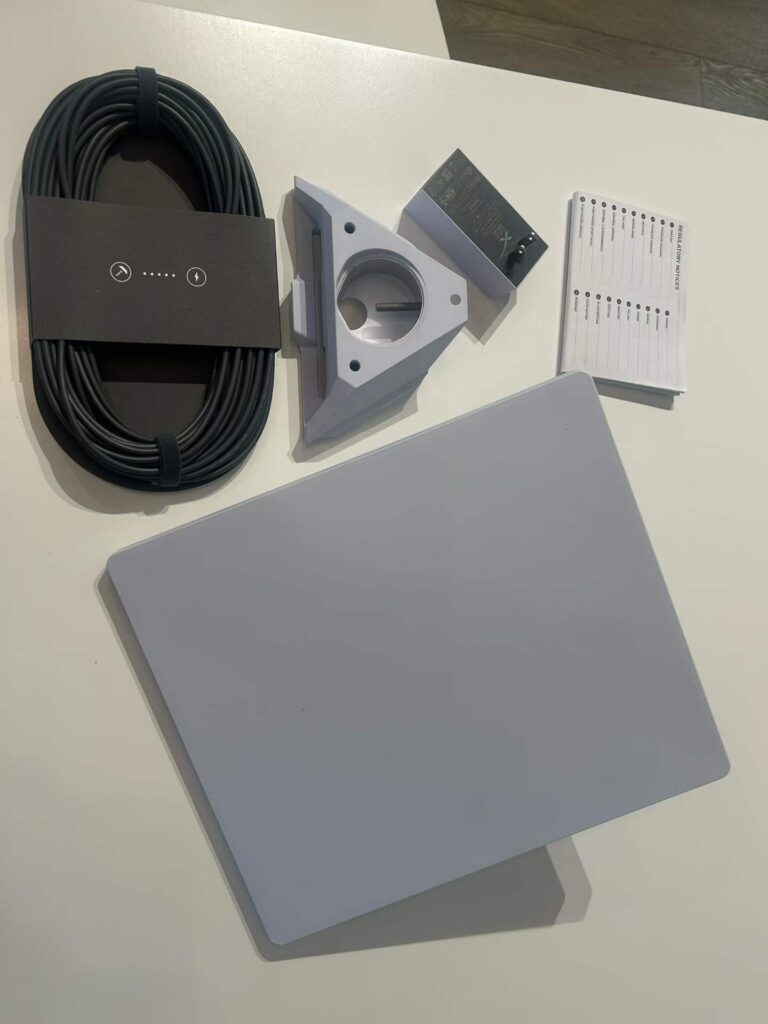
The whole thing is light enough to carry one-handed. It feels like hardware from a technology company rather than from a telecom, and you can tell where the money went.
Balcony setup: no drilling, no roof, about 20 minutes
Even though it was never going to replace my fibre, I wanted to power it up at home and learn the app before taking it anywhere that mattered.
I’m on a high floor with no yard, and I had no interest in drilling through an exterior wall, so I used the kickstand and set the dish on the balcony floor. Three steps, really:
- Find a spot with open sky. Obstructions are Starlink’s weakness, so the cleaner the view straight up, the better. A high balcony is a natural advantage. The app’s Check for Obstructions tool uses your phone’s camera to scan the sky and flags anything in the way — run it before you commit to a location.
- Place the dish and route the cable. Mine sits near the outer edge of the balcony, with the cable running along the floor to the weatherproof outdoor outlet on the wall. I tidied it with a couple of cable ties. Not elegant, but tidy enough.
- Power up and pair. As soon as it has power the Mini starts hunting for satellites (it aims electronically, so nothing visibly moves). Install the Starlink app, join the default Wi-Fi network, and follow two or three prompts. The app then shows status, live speed and obstruction history.
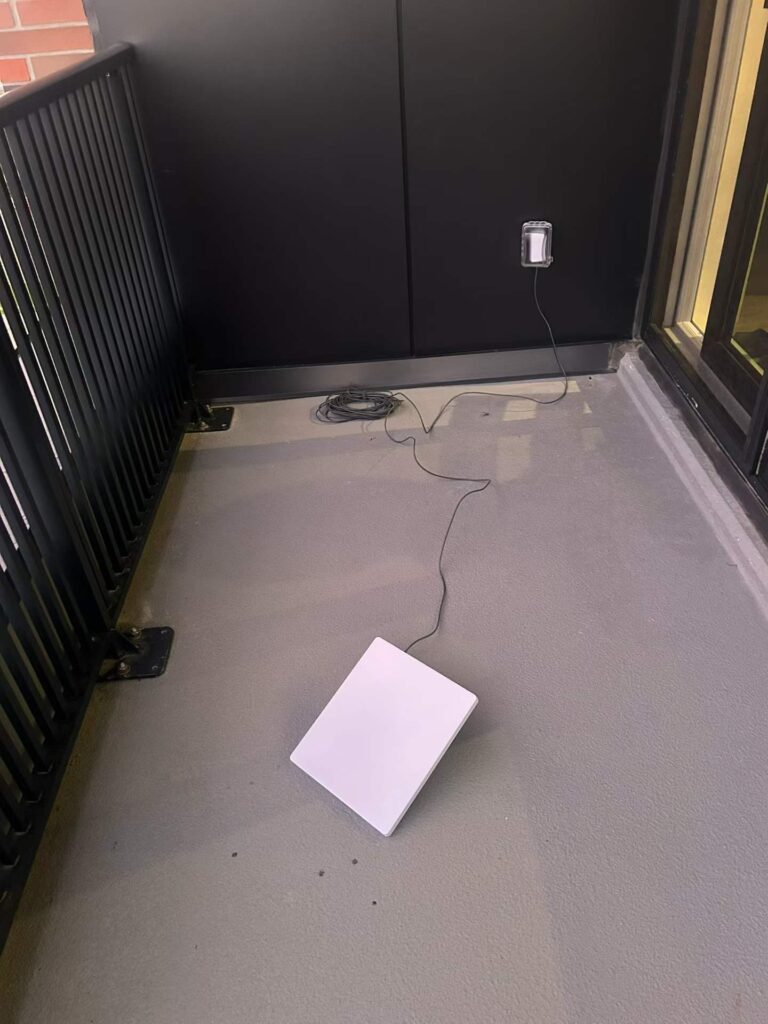
From cutting the tape to browsing on my phone took about twenty minutes, and half of that was me fussing over cable routing. There is far less ceremony here than “satellite equipment” suggests.
One safety note: if the dish is going on a high balcony, secure it or weigh it down. Toronto wind is not a joke, and a dish falling off a tower is a serious problem, not an inconvenience.
Speed test: 131 / 12 / 30 ms on a Toronto balcony
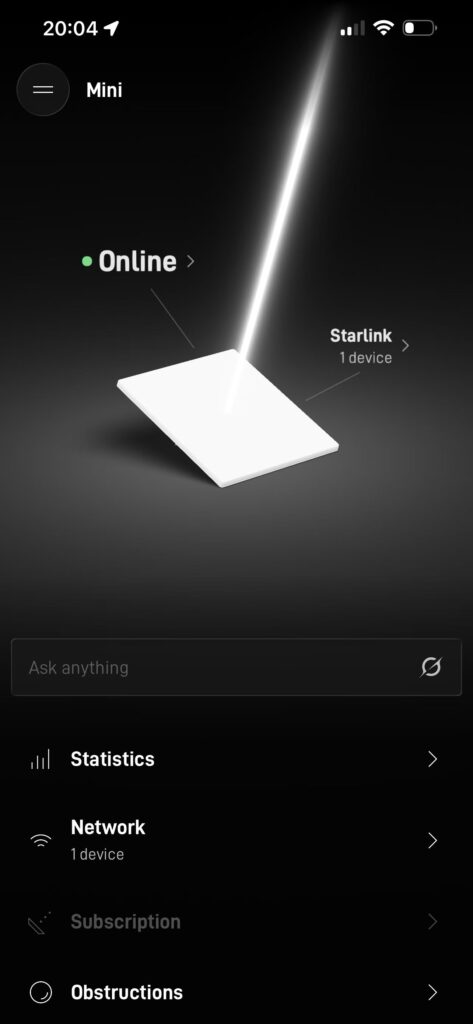
First thing I did was run the Speed Test built into the Starlink app: 131 Mbps down, 12 Mbps up, 30 ms latency. The app’s home screen confirmed the device as a Mini and showed it online, so the little dish really had found satellites and gone to work.
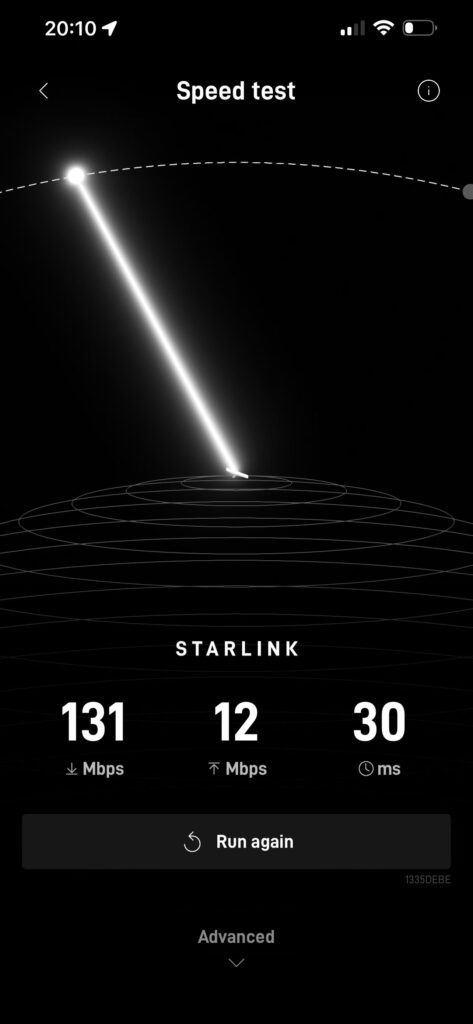
Is that good? For context, official and third-party figures put typical Canadian Starlink performance at roughly 180 Mbps down, 22 Mbps up and 36 ms latency, with real-world results generally landing between 100–200 Mbps down, 5–20 Mbps up and 25–60 ms, depending on cell congestion, weather and time of day.
So 131/12/30 is a perfectly ordinary urban result. Toronto is dense, plenty of people share the same patch of sky, and the Mini’s smaller antenna has a slightly lower ceiling than the Standard dish to begin with.
Day to day, here is how it felt:
- 4K streaming: Netflix and YouTube in 4K started instantly and never buffered.
- Video calls: Zoom and Teams were stable throughout; 30 ms is nothing for a meeting.
- General browsing: web pages, app downloads and video chat felt no different from fibre.
- Uploads: 12 Mbps up is the weak spot. Big file transfers and live streaming will feel slow, and you should plan around that.
But hold that next to the comparison: my fibre is 500 Mbps, Starlink managed 131, and Starlink costs more. Which is the point I keep coming back to — in a city, speed and price are not what you are buying. The value only shows up once the dish leaves this balcony.
The main event: putting the Mini in a Tesla
This is the part I actually bought it for. Home was the rehearsal; the goal was to carry the Mini in my Tesla so the internet travels with the car.
Picture it: drive to Algonquin for a weekend, or cross into the US on a road trip, park by a lake with no bars on anyone’s phone — and still take a video call, upload files, or put a cartoon on for the kids. That’s the Starlink-plus-Tesla combination. (If you’re still shopping for the car, ordering through an owner’s Tesla referral link currently includes three months of free Full Self-Driving (Supervised) — a decent head start on the whole setup.)
Why the two go together so well
Three reasons. They come from the same corner of the industry, so the design philosophy — minimal fuss, works out of the box — is shared. A Tesla is already a large battery on wheels with a flat interior, a big screen and Camp Mode, which makes it a genuinely good base camp. And the Mini is exactly the kind of antenna that life on the road demands: small, light, and undemanding about power.
Powering the Mini from your car (do this part properly)
Twenty to forty watts sounds trivial next to a 70-plus kWh battery, and in energy terms it is: run the Mini all day and you’ll use somewhere around one kilowatt-hour, which barely registers on your range.
The catch is not the energy, it is the delivery. The Mini wants a USB-C Power Delivery source that can hold 65 W and ideally 100 W, because it draws short spikes well above its average when it boots or runs snow melt. A Tesla’s cabin USB-C ports are designed for phones and dashcams and should not be treated as a reliable supply for it. Two setups that do work:
- A quality 12 V car adapter rated for high-wattage USB-C PD, plugged into the car’s 12 V socket, which can supply far more current than the cabin USB ports.
- A small portable power station (EcoFlow, Anker and similar) with a 100 W USB-C PD output. It powers the Mini and your laptop at the same time, and you can top the station back up from the car when it runs low. On a Cybertruck, the Powershare outlets do the same job.
In practice the thing to watch in a Tesla is not the dish at all — it’s the climate control and Sentry Mode draining the battery while you sit still. The internet is the cheap part.
Parked use versus in-motion use
Parked is easy: set the Mini on the roof or on the ground beside the car with a clear view of the sky, and it aims itself. Phones, tablets and laptops join the Mini’s Wi-Fi, and the car itself can connect too — parked on Starlink, you can stream, download games and pull software updates without touching your cellular data.
Using it while actually driving is a different project. You need a proper roof mount so the dish cannot move, and your plan has to permit in-motion use; check Starlink’s current terms, since the rules and supported hardware change. That is territory for serious long-distance travellers, not weekend campers.
The scenario I keep coming back to is a Canadian winter: sitting inside the car with the heat running on Camp Mode, the Mini outside with a clear view of the sky, laptop on a video call. Minus fifteen outside, nobody around for miles, and you have a warm, connected office. That combination really is something you only unlock after buying the car.
If that’s the setup you’re after, I’ve written more about it in Starlink + Tesla: internet for road trips, camping and remote work and in the broader Tesla mobile office guide.
Where I actually am with the car setup
To be straight with you about what is tested and what is not: the power setup and parked use are done and behave as described. Long in-motion runs, border crossings and multi-day off-grid use are still on my list, and I’ll write those up once I have real data. Treat the in-motion notes above as guidance on how it is meant to be done, not as my measured results.
Does Starlink survive a Canadian winter?
As someone who winters in Toronto, this was one of my first questions.
The good news: Starlink dishes have a built-in heater to melt snow, so ordinary snowfall clears itself rather than burying the antenna (the Mini’s heater is less powerful than the Standard dish’s, so after a heavy dump it’s worth brushing it off yourself). With today’s satellite density, typical rain and snow cost you some speed and the occasional hiccup rather than a dropped connection.
What actually breaks the link is never the cold — it’s obstruction. Heavy wet snow, snow piled on branches over the dish, or a thick storm cell are the things that cause a stall.
Tesla owners get a bonus here. In winter the car handles both the heat and the power, so you’re not idling a gas engine to stay warm or fumbling with equipment in the cold. A Canadian winter isn’t Starlink’s enemy; paired with a Tesla it’s arguably the season the whole setup earns its keep.
What it costs me over a year
People get stuck on whether it is “worth it,” but the trick is not to price it as home internet. For my travel-plus-backup pattern, a year looks roughly like this:
| Item | How I use it | Rough cost |
|---|---|---|
| Hardware | one-time Mini purchase; promos have dipped to around C$199, otherwise higher | one-time, spread over years |
| Service | Roam during travel season, paused or on Standby the rest of the year | Roam from about C$75/mo; Standby about C$15/mo |
| Months at full price | realistically four or five | the rest is just the standby fee |
| Referral | Canadian address, signed up through a referral link | CA$140 back, paid after two billing cycles |
| Power | from the car, roughly a kilowatt-hour a day | effectively nothing |
Framed that way — as a mobile connection you can pull out whenever you need it — the yearly spend is very manageable. You are not buying gigabytes. You are buying the assurance that on the day it matters, you have a connection.
To run the numbers for your own travel pattern, check the current Roam price for your address on the official site rather than trusting my figures, since pricing shifts with location and promotions.
What you get by ordering Starlink through my referral link
Starlink hardware promos tend to land around Black Friday; the referral stacks on top.
- Same price. Hardware, plan and shipping cost exactly what they cost on starlink.com; the link just tags the order as referred.
- Referral reward. Order through the referral link and Starlink pays you CA$140 (and me the same) once your account has stayed active for two full billing cycles. It lands as a service credit by default; in your Starlink account you can switch it to a cash payout to your bank. Hardware and plan prices are identical to ordering direct.
- How to tell it worked. Open the link, then check the checkout page or your account before paying: a referred order shows the referral reward on the order summary. If it is missing, clear the page and open the link again.
- When it pays out. After your account completes two full monthly billing cycles. The 30-day trial still applies; a refunded order does not count.
| Plan (Canada) | Monthly | Who it suits |
|---|---|---|
| Residential | CA$75 / $115 / $150 | Home, cottage, farm (100 / 200 Mbps tiers only in some areas) |
| Roam 100GB / 300GB / Unlimited | CA$75 / $110 / $200 | Mini in the car, RV, camping; pause for CA$15/month when idle |
Get Starlink with my referral (Canada) → Which plan? 2-minute plan finder →
Canadian service addresses only. Prices verified on starlink.com in September 2026; the full price tables by province, the referral walkthrough and the 40-question FAQ live on my Starlink site WeConnectSky: prices · cost by province · how the referral works. Car power and wiring: my Model Y 12V test.
Five things I’d tell a first-time buyer
- Obstructions matter more than anything else. Scan the sky with the app before you install. Trees, eaves and the next building over all cause dropouts.
- City speeds are lower, and that’s normal. Don’t calibrate your expectations on rural reviewers posting 250 Mbps screenshots.
- Upload is the weak link. If you stream or move large files, decide whether 5–20 Mbps up is enough before you buy.
- Do the math first. With cheap fibre at home, don’t try to replace it. Spend the money on what Roam gives you instead.
- Prices and coverage move. Plans vary by postal code and promotions come and go; confirm your destination is covered in the app before you leave.
Frequently Asked Questions
What’s the difference between the Starlink Mini and the standard dish?
The Mini is smaller and lighter, has Wi-Fi built into the dish, draws about 20–40 W, and fits in a backpack, so it’s built for travel. The Standard dish is larger, expects a permanent mount and has a higher speed ceiling, so it’s the better choice as a rural home’s main connection. If your use case is road trips, camping, vehicles or cross-border travel, buy the Mini.
I have cheap fibre in the city. Should I still get Starlink?
Not as a replacement. My Costco Primus fibre is C$49.66 a month including tax for 500 Mbps, while Starlink’s Residential 100 plan runs C$75 plus tax (about C$84.75) for roughly 100 Mbps — twice the price for a fifth of the speed. For urban users, Starlink makes sense as a travel or backup connection, not as home internet.
Does a Starlink Roam plan work in both Canada and the US?
Yes. Roam is designed to travel with you and covers both countries, so a cross-border road trip works, and you can pause the plan month to month (Standby runs about C$15 to keep the account alive). Cross-border rules and coverage details are set by Starlink’s current terms, so check the app before you leave.
What do I get for signing up through a referral link, and does it work in the US?
Canadian customers who order through an existing customer’s referral link get CA$140 back (cash or credit) after two billing cycles, with hardware and plan prices identical to ordering direct. Starlink’s referral program requires the referrer and the new customer to be in the same country, and I am in Canada, so the perk applies to Canadian addresses only. A US reader who uses my link will not see an error, but will not receive the CA$140.
Can a Tesla power a Starlink Mini?
Yes, but use the right source. The Mini averages 20–40 W — about one kilowatt-hour over a full day, which barely touches your range — but it needs a USB-C PD supply that can hold 65–100 W through its startup spikes. Use a high-wattage 12 V car adapter or a small portable power station rather than the cabin USB ports, which aren’t built for a sustained load like this.
Can I install Starlink on a high-rise balcony? Do I need to drill?
You can, and a high balcony is actually a great spot because the sky is wide open. The included kickstand lets you stand the dish on the balcony floor with no wall penetration — just run the cable to an outdoor outlet. For long-term use, add a proper pole mount and secure it against wind.
Will rain or snow knock the connection out?
Heavy weather can cause brief wobbles, and the dish has a heater that melts snow off itself. With current satellite density, outright outages are rare and most days you’d never notice. For mission-critical work, keep a phone hotspot as a backup.
How do I decide whether Starlink is worth it?
Count the days each year you’re somewhere without fibre and without dependable cell service. If you travel, camp, cross borders or live where coverage is thin, Starlink sells you something no ground provider can. If you’re in the city year-round with cheap fibre at home, it isn’t money well spent.
The bottom line
Once I’d done the arithmetic, my view settled somewhere reasonable: in a city, Starlink cannot replace cheap, fast fibre, and buying it purely for home use is a poor deal. But a dish that fits in a backpack, rides in the car, and keeps working anywhere between Toronto and the US border is a kind of freedom no ground provider sells.
You aren’t buying megabits. You’re buying the certainty of being online wherever you happen to be — and that’s the most compelling part of this whole ecosystem.
Ready to order Starlink in Canada? Use this link and get CA$140 back
Same hardware price, same plan price. Sign up through the referral and Starlink pays you CA$140 after two billing cycles; I get the same amount that helps keep these hands-on tests coming. Canadian addresses only.
And if you haven’t bought the car yet, an owner’s Tesla referral link currently adds three months of free Full Self-Driving (Supervised), worth roughly $297 at the $99/month subscription price.
About the author: written by Lifei Zhou, a Toronto-based Tesla Model Y owner who runs tslna.com and documents the real cost of driving, travelling and staying connected in Canada. Every unboxing, installation and speed-test photo here is mine, and the equipment was bought at full price — this is not a manufacturer review unit.
Sources and currency: reference pricing and performance figures are drawn from Starlink’s official pages and third-party reporting (MobileSyrup, Drive Tesla Canada, FastSat, SatelliteInternet and others) published in 2026, current as of September 2026. The home fibre price (Costco Primus, C$49.66 for 500 Mbps), the hardware (Starlink Mini) and the measured speeds (131/12/30 ms) are my own and won’t predict performance at your address. Starlink pricing and plans vary by postal code and change frequently — confirm on the official site. Referral benefits are governed by Starlink’s official referral program terms.
Disclaimer: this is a personal experience report, not purchase or investment advice. It contains referral and affiliate links; ordering through them may earn me a small reward at no extra cost to you. See our disclosure page. Image credit: the satellite photo is by SpaceX via Wikimedia Commons (public domain); all other photos are the author’s own.

About the author: Lifei Zhou
Model Y owner since 2022Ontario STO registered apprentice · 310SWorks on Porsche, Mercedes, BMW, Audi weeklyHundreds of readers referred (est.)
Lifei is a Tesla owner based in Canada, writing practical, fact-checked Tesla guides for US and Canadian drivers — buying, ownership, insurance, charging, and TSLA investing, all from first-hand experience.