
Working Remotely From Your Tesla: The Complete Mobile Office Setup (2026)
Working Remotely From Your Tesla: The Complete Mobile Office Setup (2026)

In one sentence
Turn your Model 3, Model Y, or Cybertruck into a quiet, powered mobile office: Camp Mode, all-day charging, staying online with Premium Connectivity and Starlink, plus the gear that matters.
Somewhere between the coffee-shop table with no outlets and the home office where the dog keeps barking, a lot of North American workers have discovered a third space: their car. If that car happens to be a Tesla, you already own one of the best mobile offices money can buy. It has a big screen, a comfortable climate-controlled cabin, a huge battery that can run all day, and — with the right setup — a solid internet connection even where cell coverage is thin. This guide walks through exactly how to turn your Model 3, Model Y, or Cybertruck into a productive remote workspace, what it costs, and the handful of accessories that actually make a difference.
Disclosure: some links are affiliate/referral links, and we may earn a commission at no extra cost to you. See our disclosure page.
📋 Contents
- Why a Tesla Makes a Surprisingly Good Mobile Office
- Camp Mode vs. Keep Climate On vs. Dog Mode: Which One to Use
- Powering a Full Workday Without Draining Your Battery
- Staying Connected: Premium Connectivity, Hotspots, and Starlink
- Comfort, Privacy, and Focus
- Best Places to Park and Work (and Where Not To)
- What It Costs to Get Started
- Frequently Asked Questions
- The Bottom Line
Why a Tesla Makes a Surprisingly Good Mobile Office
Working from a gas car means idling the engine for heat or A/C — noisy, smelly, and illegal to leave running in many places. A Tesla removes all of that. The cabin stays whisper-quiet, you can hold a set temperature for hours on a tiny fraction of the battery, and every USB-C port and the 12V outlet keep delivering power without an engine running. The center touchscreen doubles as a second monitor for video calls or reference material, and the low, flat floor gives you room to stretch out during breaks.
For hybrid workers, field sales reps, real-estate agents between showings, gig drivers waiting on their next ping, students, and anyone who just needs 90 focused minutes away from the house, the car becomes a rolling private booth. The trick is knowing which built-in mode to use, how to keep the battery topped up, and how to stay online.
Camp Mode vs. Keep Climate On vs. Dog Mode: Which One to Use
Tesla gives you three ways to keep the cabin powered while parked, and they behave differently. For a work session, Camp Mode is almost always the right choice: it keeps climate, power, lights, and the screen running indefinitely, and it disables the “get out to walk away” logic so the car won't shut itself down while you sit still. Here is how they compare.
| Feature | Camp Mode | Keep Climate On | Dog Mode |
|---|---|---|---|
| Best for | Working, resting, camping | Quickly stepping away | Leaving pets safely |
| Screen stays on | Yes (Camp UI + apps) | Yes | Shows a “owner will be back” message |
| USB & 12V power | Yes | Yes | Yes |
| Runs indefinitely | Yes | Yes | Yes |
| Air recirculation / low noise | Optimized for occupants | Standard | Standard |
To start Camp Mode, put the car in Park, tap the fan icon on the climate bar, and select Camp. You can then set your temperature and leave. For a deeper walkthrough of the feature and its overnight tricks, see our full Tesla Camp Mode guide.
Powering a Full Workday Without Draining Your Battery
The number that scares people is smaller than they think. Tesla and multiple owner tests put Camp Mode's draw at roughly 1% of battery per hour in mild weather — call it 6–10% for a full workday, more in a heat wave or deep freeze when the climate system works harder. On a Long Range battery that still leaves you plenty of range to drive home. Charging your phone and laptop off the USB-C ports barely registers.
If you regularly work from the same spot — a driveway, a job site with an outlet, a friend's place — the smartest move is to simply keep the car plugged in. Camp Mode runs happily while charging, so the charger replaces the energy climate control uses and your battery essentially never moves. Even a standard 120V household outlet is enough to offset Camp Mode's draw. A portable charger lives in the frunk for exactly this: the official Tesla Mobile Connector (NACS) plugs into any regular wall outlet and turns a garage, cabin, or workshop into a charging spot — expect it to run in the low-to-mid hundreds of dollars. It is the one accessory that changes a Tesla mobile office from “a few hours” to “all day, every day.”
Two habits keep things safe: don't let the pack drop below ~20% if you still need to drive somewhere, and in extreme cold, precondition the battery before you leave. If you want the full picture of how a parked Tesla uses energy, our guide to vampire drain and battery loss while parked breaks down every background process.
Staying Connected: Premium Connectivity, Hotspots, and Starlink
A mobile office is only as good as its internet. Teslas connect to the outside world in three ways, and you'll likely mix all three.
Built-in connectivity. Tesla's Premium Connectivity plan (about US$9.99/month or $99/year; C$13.99/month or $140/year) gives the car its own cellular data for maps, live traffic, and streaming. It runs on the same cellular towers your phone uses, so where there's a bar or two of signal, you're set. Verify current pricing and coverage on Tesla's official connectivity page.
Your phone as a hotspot. The car can connect to any Wi-Fi network, including your phone's personal hotspot. This is how most people get their laptop online in the car — the car's data plan powers the screen, and your phone (or a dedicated hotspot) powers everything else. It also unlocks video streaming on the car's screen without paying for Premium Connectivity.
Starlink for the dead zones. Here's where two of Elon Musk's companies quietly work together. If your favorite work spot is a lakeside pull-off, a rural job site, or a cabin two hours from the nearest tower, cellular simply isn't there — and that's exactly what SpaceX's Starlink solves. The laptop-sized Starlink Mini (around US$199 hardware, with Roam data plans starting near $50/month) sets up in minutes, sips power you can run off the car, and delivers 100+ Mbps almost anywhere with a clear view of the sky. For Tesla owners who chose an EV partly to get out into remote country, pairing the two is a genuinely powerful combo: silent climate from the car, satellite internet overhead. Canadian readers can sign up through this Starlink referral link (this offer is for Canada; U.S. customers should order at starlink.com directly). Check current plan pricing before committing, since Roam tiers change.
Comfort, Privacy, and Focus
The difference between “I lasted 20 minutes” and “I got three hours of deep work done” comes down to a few cheap upgrades. None of these are essential, but each removes a specific annoyance.
- Privacy and glare control. A parked car with someone typing inside draws glances, and afternoon sun turns the screen into a mirror. A set of custom-fit windshield and window shades fixes both. The popular BASENOR folding sunshade (typically $30–$50) blocks the front glass in seconds and folds flat behind the seat.
- A tidy “desk.” Loose cables, pens, and a phone sliding around kill focus. A fitted center-console tray such as the BANKKY console organizer (about $20–$35, sized for Highland Model 3 and Juniper Model Y) gives everything a home within reach.
- Food and drinks that last. If you're parked for a full day, a small 12V fridge like the BougeRV 30-quart car fridge keeps lunch and cold brew ready without repeated store runs. It draws modest power and pairs naturally with Camp Mode.
For a full rundown of gear that earns its place in the trunk, our Tesla accessories section covers everything from mats to chargers.
Best Places to Park and Work (and Where Not To)
Not every parking spot is created equal. The best mobile-office locations combine a decent cell signal (or clear sky for Starlink), a level surface, shade or a nice view, and a lack of “no loitering” signage.
- Great: your own driveway or garage (plug in!), Supercharger stalls if you're also topping up, public library and rec-center lots, trailheads, waterfront day-use areas, and big-box lots that welcome dwell time.
- Use judgment: business parking during their busy hours, residential streets for long stretches, and anywhere overnight without checking local rules first.
- Avoid: spots that block traffic or accessibility access, private lots posted against loitering, and — obviously — parking where you'd obstruct emergency access.
A Supercharger session is a natural work window: plug in, start Camp Mode, and get 20–40 minutes of focused work while the car charges. If you're planning longer hauls between work sessions, our road-trip power gear guide covers the inverters, batteries, and cables worth packing.
What It Costs to Get Started
You can build a capable mobile office for very little, then add connectivity if your work takes you off-grid. Rough North American pricing:
| Item | Typical cost (USD) | Needed? |
|---|---|---|
| Camp Mode | Free (built in) | Core |
| Premium Connectivity | ~$9.99/mo or $99/yr | Recommended |
| Windshield/window shades | $30–$50 | Nice to have |
| Console organizer | $20–$35 | Nice to have |
| Portable charger (Mobile Connector) | low-to-mid hundreds | For all-day sessions |
| Starlink Mini + Roam plan | ~$199 + from ~$50/mo | Only if off-grid |
And if you don't own the Tesla yet? Ordering a new Model 3, Model Y, or Cybertruck through a referral link currently adds 3 months of free Full Self-Driving (Supervised), which generally doesn’t stack with the standard trial — a small perk for the car that becomes your office.
Frequently Asked Questions
Is it legal to work or nap in my parked Tesla?
Generally yes on your own property, in most public lots that allow dwell time, and at Superchargers. Rules vary for overnight parking, residential streets, and private lots — check local signage and municipal bylaws. Camp Mode itself is designed for stationary, occupied use.
How much battery does a full workday actually use?
In mild weather, Camp Mode draws roughly 1% per hour, so a 6–8 hour day costs about 6–10% of your battery. Extreme heat or cold raises that. Plug into any outlet and the draw is effectively erased.
Can I get my laptop online in the car without Premium Connectivity?
Yes. Connect the car — and your laptop — to your phone's hotspot, or to a dedicated hotspot or Starlink. Premium Connectivity powers the car's own screen and maps, but your laptop just needs any Wi-Fi source.
Do I need Starlink if I have a good phone plan?
No — in town or near highways, a phone hotspot is plenty. Starlink earns its keep only where cellular coverage is weak or absent: remote job sites, backcountry pull-offs, and cabins. For Canadians who regularly work from those places, it's transformative; U.S. users in coverage areas usually don't need it.
Will running Camp Mode all day hurt my battery long-term?
No. The draw is small and well within normal use. Standard battery-care habits — avoiding regular deep discharges and not sitting at 100% for long — matter far more than occasional Camp Mode sessions.
Which Tesla is best as a mobile office?
Any of them work, but the Model Y and Model Y L offer the most interior room and a flat load floor for stretching out, while the Model 3 is the most efficient for long stationary sessions. The Cybertruck's outlets add extra power flexibility.
The Bottom Line
- Use Camp Mode for any work session — it keeps climate, power, and the screen on indefinitely for about 1% of battery per hour.
- Plug in whenever you can; a portable Mobile Connector turns any outlet into an all-day power source and zeroes out battery drain.
- For internet, layer Premium Connectivity, a phone hotspot, and — off-grid — Starlink, which pairs naturally with a Tesla for remote work.
- A few cheap add-ons (shades, an organizer, a 12V fridge) make long sessions genuinely comfortable.
- Mind local parking rules, keep enough range to drive home, and precondition in extreme cold.
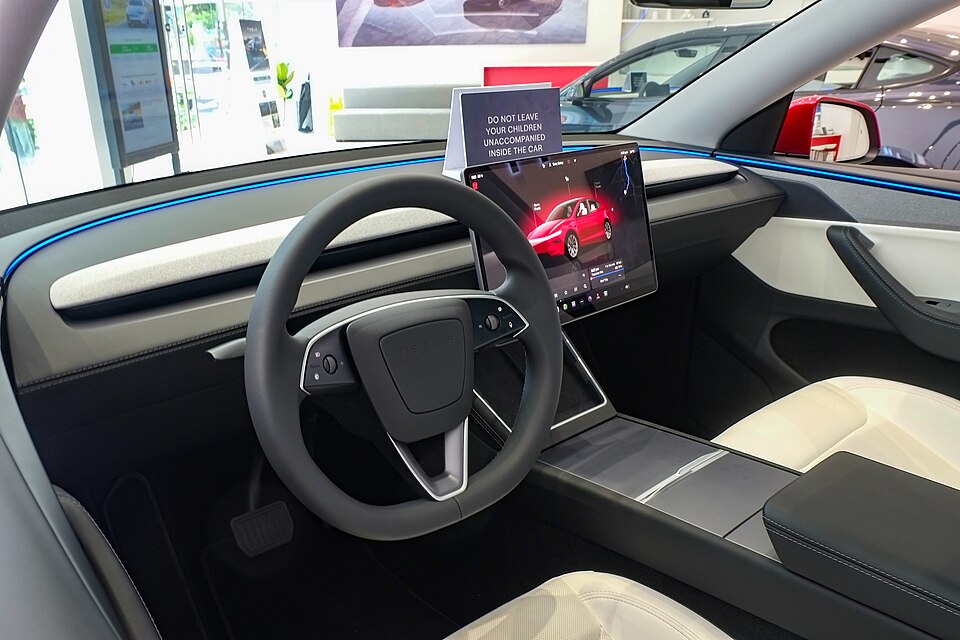
Information is current as of September 2026 and reflects North American pricing and features; connectivity plans, accessory prices, and referral perks change, so confirm details with Tesla and Starlink before purchasing. This article is for general information only and is not legal or financial advice. Some links are affiliate or referral links — see our disclosure page. Image credit: Tesla Model Y 2025 interior by Ethan Llamas, licensed under CC BY-SA 4.0, via Wikimedia Commons.

About the author: Lifei Zhou
Model Y owner since 2022Ontario STO registered apprentice · 310SWorks on Porsche, Mercedes, BMW, Audi weeklyHundreds of readers referred (est.)
Lifei is a Tesla owner based in Canada, writing practical, fact-checked Tesla guides for US and Canadian drivers — buying, ownership, insurance, charging, and TSLA investing, all from first-hand experience.