
Starlink + Tesla: Internet for Road Trips, Camping & Remote Work (2026)
Starlink + Tesla: Internet for Road Trips, Camping & Remote Work (2026)

In one sentence
How North American Tesla owners can pair a Starlink Mini with their car for reliable internet off-grid — powering it, 2026 plan costs, and the gear that earns its place in the frunk.
Buy a Tesla and you quickly learn to trust the car’s own connection: live traffic, satellite maps, music streaming and over-the-air updates all arrive over its built-in cellular link. But that connection stops at the car. The moment you park at a backcountry trailhead, a lakeside campsite, a rural cabin or a highway rest stop with one bar of signal, your laptop, the kids’ tablets and your phone hotspot are on their own — and that is exactly where cellular dead zones live. This is the gap Starlink fills, and because both Tesla and Starlink belong to Elon Musk’s orbit of companies, the two products fit together more naturally than most people expect.
This guide is written for North American Tesla owners who want reliable internet away from town: how the pocket-sized Starlink Mini pairs with a Tesla, how to power it from your car (this is the part most articles get wrong), what the 2026 plans really cost, and which accessories actually earn their place in the frunk. If you are still shopping for the car itself, ordering through a Tesla referral link currently adds three months of free Full Self-Driving (Supervised) on a new Model 3, Model Y or Cybertruck — a small head start before you even think about connectivity gear.
Disclosure: some links are affiliate/referral links, and we may earn a commission at no extra cost to you. See our disclosure page.
📋 Contents
- Why pair Starlink with your Tesla?
- Starlink Mini vs Standard: which kit fits a Tesla owner?
- How to power a Starlink Mini from your Tesla (the part people get wrong)
- Starlink plans and real costs in 2026
- Real-world setups: road trips, camping and off-grid work
- Starlink vs Tesla Premium Connectivity: not the same thing
- A Tesla owner’s Starlink setup checklist
- Frequently Asked Questions
- The bottom line
Why pair Starlink with your Tesla?
Teslas are unusually good base camps. The cabin stays climate-controlled for hours on a fraction of the battery thanks to the heat pump, the big glass roof makes the interior feel like a lounge, and Camp Mode keeps power and air flowing while you work or sleep. What a Tesla cannot do is manufacture cellular coverage — and North America has a lot of empty map. Northern Ontario, the Rockies, the desert Southwest, the Maritimes, most national parks: these are places where a Tesla owner might spend a weekend and where a normal phone hotspot simply gives up.
Cellular coverage looks complete on a carrier map but is full of holes in practice — the FCC’s national broadband map shows just how much of the rural U.S. still lacks reliable service. Starlink solves connectivity from low-Earth orbit, so it works wherever it can see open sky rather than wherever a cell tower happens to be. For a Tesla owner that unlocks a genuinely different kind of trip: video calls from a mountain pass, uploading a day’s photos from a fishing camp, streaming to keep kids sane on a long charging stop, or simply keeping a home office running from a cabin that has never had wired broadband. Because the two companies share an owner and a design language, the ecosystem also just feels coherent — you are buying into one vision of getting people, energy and data anywhere on the continent. Our Tesla mobile-office guide covers the working-from-the-car side; this article is about the pipe that feeds it.
Starlink Mini vs Standard: which kit fits a Tesla owner?
Starlink sells more than one antenna, but for Tesla owners the decision almost always comes down to two: the ultra-portable Mini and the larger Standard flat-panel dish. The Mini is the one built for exactly this life — it is roughly the size of a laptop, has the Wi-Fi router built into the dish, and sips little enough power that you can run it from a battery. The Standard dish is faster and better for a fixed cabin, but it is bigger, hungrier and needs its own separate router.
| Feature | Starlink Mini | Starlink Standard |
|---|---|---|
| Size / portability | Backpack-sized, router built in | Large panel + separate router |
| Typical power draw | ~20–40 W (runs off a battery) | ~50–75 W (wants AC/inverter) |
| Power input | USB-C PD (65 W+ source) | Barrel/AC via power brick |
| Best for | Road trips, camping, mobile work | Fixed cabin or long stays |
| Hardware price (2026) | Around $199 USD (promos vary) | Higher; often bundled with a plan |
For nine out of ten Tesla owners the answer is the Mini. It fits in the frunk with room to spare, it can be up and online in a couple of minutes, and — crucially — its modest power appetite is what makes running it from your car practical. Prices and promotions change often, so confirm the current hardware cost on Starlink’s own Roam page before you buy.
How to power a Starlink Mini from your Tesla (the part people get wrong)
Here is the honest truth that most “Tesla + Starlink” posts skip: you generally cannot just plug the Mini into a Tesla’s built-in USB-C port and expect it to run. The Mini needs a USB-C Power Delivery source that can sustain at least 65 watts (100 W is better), and Tesla’s cabin USB-C ports are designed for charging phones and feeding a dashcam — not for holding a steady 65-watt-plus load for hours. They may work briefly, they may not, and they can throttle. So plan around a proper power source instead.
You have three reliable options, in rough order of practicality:
1. A portable power station (best all-rounder). A small LiFePO4 power station with a 100 W USB-C PD output runs the Mini cleanly and can also top up your laptop, phones and a 12 V fridge. A 250–300 Wh unit will keep a Mini online for roughly six to ten hours depending on draw, and it recharges from a wall outlet, the car’s 12 V socket, or a solar panel. Something like the EcoFlow River 3 Plus (roughly the $250–$350 range) hits the sweet spot: quiet, USB-C PD out, and light enough to live in the frunk. This is the setup I recommend to most people because it decouples your internet from the car entirely — the Mini keeps working even while you drive, and you never touch the traction battery.
2. A USB-C PD source plus the right cable. The Mini ships with its own DC input, so to feed it from any USB-C PD source you need a proper adapter cable. The single most important accessory in this whole guide is a good Starlink Mini USB-C-to-DC power cable — it converts a 100 W PD source into the barrel input the dish expects, with a weather-sealed connector so a little rain does not end your trip. Under $30 and worth every cent; without it you are stuck with the wall brick. Pair it with a high-output power bank or the power station above.
3. Cybertruck Powershare (if you own one). Cybertruck is the one Tesla that can power a Starlink dish directly: its Powershare outlets deliver real 120 V household power from the bed and cabin, so you can run either the Mini or the Standard dish off a normal plug with no extra battery at all. Model 3, Model Y, Model S and Model X do not offer 120 V outlets or vehicle-to-load in North America, which is exactly why the power-station route matters for the rest of the lineup. For the full picture, see our Camp Mode guide, which covers keeping the cabin powered while you are parked.
Starlink plans and real costs in 2026
The hardware is a one-time buy; the service is where you choose. For mobile Tesla use you want a Roam plan (formerly “RV”), which is designed to move with you and can be paused in the months you are not travelling. Exact pricing varies by ZIP or postal code because Starlink adjusts for local demand, so treat the figures below as a 2026 snapshot and confirm at checkout.
| Plan (Roam) | United States | Canada |
|---|---|---|
| Roam, limited data bucket | From ~$50/mo (metered) | From ~C$50–$80/mo |
| Roam Unlimited (land use) | Around $165–$175/mo | Around C$200/mo |
| Standby (pause between trips) | About $10/mo | About C$10/mo |
The pausing feature is the quiet hero for a Tesla owner: if you only road-trip in summer, you can drop to the low monthly Standby fee for the winter and reactivate a full plan the day before you leave — no contract, no reinstall. The Mini’s power draw is trivial on your electricity bill, too; at typical residential rates you are talking a few dollars a month even running it constantly at a cabin.
A note for Canadian readers: rural connectivity remains a real gap in Canada — the CRTC tracks how many households still lack the target broadband speeds — and Starlink coverage across the country is strong, and for those north of the border you can sign up through this Starlink referral link, which occasionally carries a promotional service credit for new customers. (The referral is for Canadian accounts; U.S. readers should order directly from Starlink’s site.) If your Tesla life is more Muskoka than Manhattan, a Roam plan plus a Mini turns any lakeside site into a working office. Canadian Tesla shoppers can also see our Model Y Canada guide for the vehicle side of the equation.
What you get by ordering Starlink through my referral link
Starlink hardware promos tend to land around Black Friday; the referral stacks on top.
- Same price. Hardware, plan and shipping cost exactly what they cost on starlink.com; the link just tags the order as referred.
- Referral reward. Order through the referral link and Starlink pays you CA$140 (and me the same) once your account has stayed active for two full billing cycles. It lands as a service credit by default; in your Starlink account you can switch it to a cash payout to your bank. Hardware and plan prices are identical to ordering direct.
- How to tell it worked. Open the link, then check the checkout page or your account before paying: a referred order shows the referral reward on the order summary. If it is missing, clear the page and open the link again.
- When it pays out. After your account completes two full monthly billing cycles. The 30-day trial still applies; a refunded order does not count.
| Plan (Canada) | Monthly | Who it suits |
|---|---|---|
| Residential | CA$75 / $115 / $150 | Home, cottage, farm (100 / 200 Mbps tiers only in some areas) |
| Roam 100GB / 300GB / Unlimited | CA$75 / $110 / $200 | Mini in the car, RV, camping; pause for CA$15/month when idle |
Get Starlink with my referral (Canada) → Which plan? 2-minute plan finder →
Canadian service addresses only. Prices verified on starlink.com in September 2026; the full price tables by province, the referral walkthrough and the 40-question FAQ live on my Starlink site WeConnectSky: prices · cost by province · how the referral works. Car power and wiring: my Model Y 12V test.
Real-world setups: road trips, camping and off-grid work
The road-trip supercharge stop. Superchargers are getting busier, and a 20-minute stop is dead time unless you can use it. With the Mini running off a power station on the frunk lid or a picnic table, everyone gets fast internet while the car charges — the kids stream, you clear email, nobody fights over a weak hotspot. Combine it with the gear in our Tesla road-trip power gear guide and a charging stop becomes the most productive part of the drive.
The campsite. Camp Mode keeps the cabin comfortable overnight; the Mini keeps you connected. Fold the rear seats, drop in a Tesla-compatible inflatable mattress (the $60–$100 range for a well-fitted SUV pad), and you have a connected bedroom that recharges itself at the next Supercharger. Because the Mini has Wi-Fi built in, there is nothing to configure beyond powering it on and pointing it at open sky.
The remote work week. If you are running a home office out of a cabin or working on the move for days at a time, add a 12 V fridge so you are not driving to town for groceries and a cold drink. A compact unit like the BougeRV 12 V portable fridge (roughly $200–$300) runs happily off the same power station that feeds your Mini, so your entire off-grid kit — internet, food, laptop — comes back to one battery you recharge at each charging stop. That is the whole appeal: one Tesla, one power station, and you can work from anywhere with a view of the sky.
Starlink vs Tesla Premium Connectivity: not the same thing
It is worth being clear, because the two get confused. Tesla Premium Connectivity is the car’s own subscription — about $9.99/month or $99/year in the U.S. (C$13.99/month or C$140/year in Canada) — and it powers live traffic, satellite maps, music streaming and the browser over cellular, on the car’s screen. It does nothing for your laptop, and it stops working where cellular does.
Starlink is the opposite: it is your connection, for your devices, independent of any cell tower. It will not stream to the Tesla’s dashboard (the car only talks to Tesla’s own modem), but it will keep your phones, computers and tablets online in places Premium Connectivity has never reached. Think of them as complementary — Premium Connectivity for the car, Starlink for you. Our Premium Connectivity guide breaks down what the car’s own plan does and does not include.
A Tesla owner’s Starlink setup checklist
Putting it together is genuinely simple once the power question is solved:
- Buy the Starlink Mini (not the Standard) unless you are wiring up a fixed cabin.
- Add a power station with 100 W USB-C PD output, or use Cybertruck Powershare if you have one.
- Get the correct USB-C-to-DC cable — this is the piece that makes battery power work.
- Choose a Roam plan, and set it to Standby in the off-season to save money.
- Keep the whole kit in the frunk; it weighs less than a full grocery run.
- On site, place the Mini with a clear view of the sky, power it on, and join its Wi-Fi — you are online in about two minutes.
If you have not bought the car yet, remember that ordering through a Tesla referral link adds three months of free Full Self-Driving (Supervised) — a nice bonus on the vehicle before you kit it out for the wilderness. And for more gear that pairs well with an off-grid Tesla, browse our Tesla accessories section.
Frequently Asked Questions
Can I run a Starlink Mini directly from my Tesla’s USB port?
Not reliably. The Mini needs a USB-C Power Delivery source that can hold at least 65 watts (100 W is better), and Tesla’s cabin USB-C ports are built for phones and dashcams, not a sustained high-wattage load. Use a portable power station with a 100 W USB-C PD output, or — on a Cybertruck — the 120 V Powershare outlets.
How much power does a Starlink Mini use?
Around 20–40 watts in normal use, with brief spikes to roughly 60–75 watts at startup or when the snow-melt feature runs. A 250–300 Wh power station will typically keep it online for six to ten hours.
Does Starlink work while the Tesla is driving?
The Mini can maintain a connection in motion on a Roam plan, but performance is best when parked with a clear view of the sky. If you want internet while driving, mount the dish with an unobstructed skyward view and expect occasional drops under heavy tree cover or in tunnels.
Do I still need Tesla Premium Connectivity if I have Starlink?
Yes, if you want the car’s own features. Premium Connectivity powers the Tesla’s live traffic, satellite maps and streaming over cellular, on the car’s screen. Starlink connects your personal devices and does not feed the car’s dashboard. They do different jobs.
Is Starlink worth it for occasional trips?
It can be, because you can pause the service. Buy the hardware once, run a full Roam plan only in the months you travel, and drop to the low Standby fee the rest of the year. That keeps the ongoing cost modest for weekend and seasonal users.
Which Starlink plan should a road-tripping Tesla owner choose?
A Roam plan. It is designed to move with you, works across the country, and can be paused between trips. Choose the unlimited tier if you stream or video-call heavily; a metered bucket is fine for email and light browsing.
The bottom line
- The Starlink Mini is the right antenna for almost every Tesla owner — small, USB-C powered, and up in minutes.
- Do not rely on the car’s USB ports; power the Mini from a 100 W portable power station (or Cybertruck Powershare), using the correct USB-C-to-DC cable.
- Pick a Roam plan and pause it in the off-season to keep costs down; verify pricing at checkout since it varies by location.
- Starlink and Tesla Premium Connectivity are complementary — one connects the car, the other connects you.
- One power station can run your internet, a fridge and your laptop, turning any Tesla into a self-recharging mobile office.
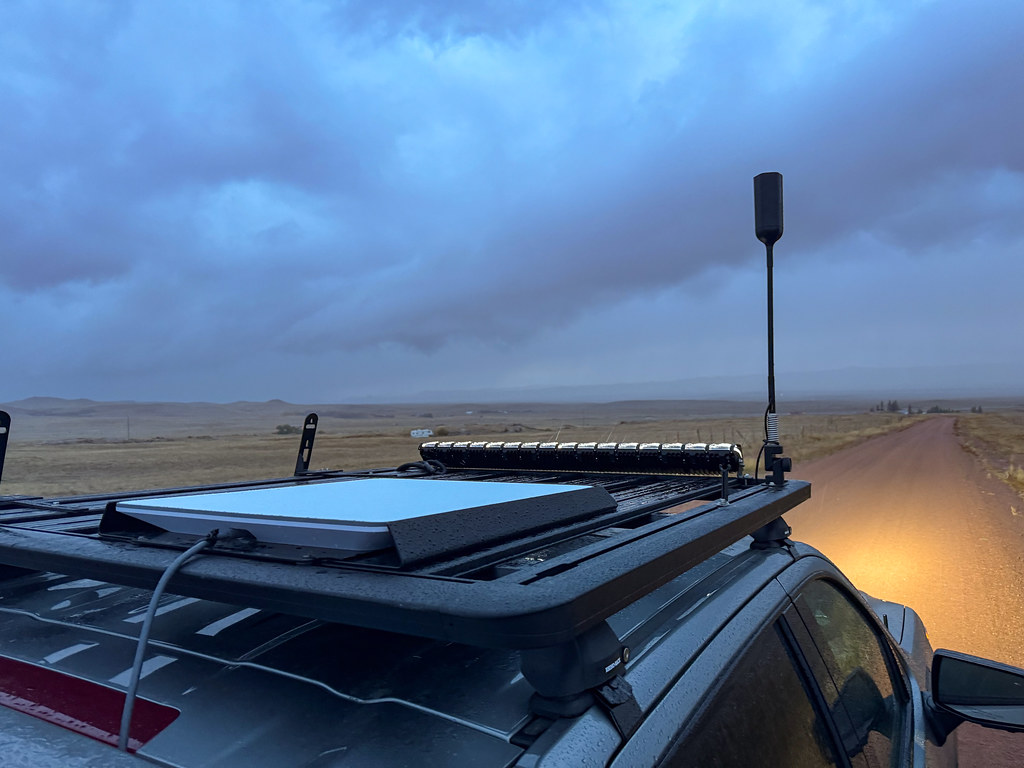
Information current as of September 2026; Starlink and Tesla pricing, plans and promotions change frequently and vary by location — always confirm current details on the official Starlink and Tesla sites before purchasing. This article is general information, not professional advice, and contains affiliate/referral links (see our disclosure page). Image credit: “Starlink Flat Panel Dish on Roof of Truck” by Tony Webster, licensed under CC BY 2.0, via Wikimedia Commons.

About the author: Lifei Zhou
Model Y owner since 2022Ontario STO registered apprentice · 310SWorks on Porsche, Mercedes, BMW, Audi weeklyHundreds of readers referred (est.)
Lifei is a Tesla owner based in Canada, writing practical, fact-checked Tesla guides for US and Canadian drivers — buying, ownership, insurance, charging, and TSLA investing, all from first-hand experience.