
Tesla 12V Battery Guide 2026: Warning Signs, Jump-Starting & Replacement Cost
Tesla 12V Battery Guide 2026: Warning Signs, Jump-Starting & Replacement Cost

In one sentence
The Tesla 12V battery runs your electronics and lets the main pack connect. Here are the warning signs, how to jump-start it, and 2026 replacement costs.
Ask most Tesla owners about “the battery” and they picture the giant high-voltage pack under the floor. But the part that actually strands people on a driveway is the humble 12-volt battery — the same low-voltage system every gas car has. It runs your door handles, screen, lights, and the contactors that connect the big pack. When it dies, your Tesla won’t unlock, won’t wake, and won’t drive, no matter how much range is showing. The good news: a dying 12V battery almost always warns you first, and knowing what to do turns a tow-truck afternoon into a five-minute fix.
Disclosure: some links are affiliate/referral links, and we may earn a commission at no extra cost to you. See our disclosure page.
📋 Contents
- What the 12V Battery Actually Does
- Lead-Acid vs Lithium: Which One Is in Your Tesla?
- Warning Signs Your 12V Battery Is Dying
- How to Wake or Jump-Start a Tesla With a Dead 12V Battery
- Replacement Cost and Your Options
- How to Make Your 12V Battery Last Longer
- Is It Worth Upgrading an Older Tesla to Lithium?
- Frequently Asked Questions
- The Bottom Line
What the 12V Battery Actually Does
Your Tesla runs two separate electrical systems. The high-voltage pack (350–450 volts) is there to move the car. The low-voltage system — nominally “12 volts,” even on the newer lithium units that sit closer to 15 volts — runs everything else: the touchscreen, door handles, interior lights, the 12V accessory socket, and, critically, the contactors that physically connect the high-voltage pack to the rest of the car.
That last job is why a small, cheap battery can immobilize an expensive car. When you walk up and the handle presents, when the screen boots, when the car “wakes” — that is the 12V system doing the work. While you’re driving, a DC-to-DC converter quietly tops the 12V battery up from the main pack, so it rarely runs flat on its own. The problem is age: the 12V battery wears out on its own schedule, independent of how healthy your main pack is. If you want the long view on the big pack instead, we cover that in our Tesla battery degradation guide.
Lead-Acid vs Lithium: Which One Is in Your Tesla?
Tesla has used two very different 12V batteries, and which one you have changes everything about lifespan, cost, and whether you should touch it yourself.
Older lead-acid (roughly pre-2022 Model 3/Y, and older S/X): a small conventional 12V battery, much like any gas car’s. Cheap to buy, but it typically lasts only two to four years and is often the very first part of a Tesla to fail.
Tesla began rolling out a compact lithium-ion low-voltage battery with the refreshed Model S/X in 2021, and Model 3 and Model Y transitioned during late 2021–2022. These units run around 15.5–16 volts, weigh a fraction of the old lead-acid bricks, and are rated to last far longer — often close to the life of the car. If you’re shopping for a new Tesla, it will have the lithium unit; ordering a new Model 3, Model Y, or Cybertruck through a referral link also gets you 3 months of free Full Self-Driving (Supervised).
| Feature | Lead-acid (older) | Lithium-ion (2021–2022 onward) |
|---|---|---|
| Typical lifespan | 2–4 years | Often 8–10+ years |
| Resting voltage | ~12.4–12.9 V | ~14–16 V |
| Weight | Heavy (~9–12 kg) | Light (~3–4 kg) |
| DIY-friendly | Yes, with care | Usually left to Tesla |
| Warning before failure | Often little/none | Usually a dashboard alert |
Not sure which you have? Open your touchscreen service menu, or simply check the build date on the driver-side door jamb. Anything built before 2022 is worth watching closely.
Warning Signs Your 12V Battery Is Dying
Unlike a gas car that just clicks and won’t crank, a Tesla usually gives you a heads-up. Watch for these:
- A dashboard message such as “12V battery needs service — car may not restart” or “Low voltage battery, power reduced.”
- Door handles that respond slowly or intermittently.
- The touchscreen rebooting on its own, or interior lights flickering.
- The car failing to wake from the phone app, then working a moment later.
- On older lead-acid cars: a resting voltage that has drifted below about 12.2 V.
The single most important rule: treat a 12V warning as a days-not-weeks item. Once the battery is too weak to hold the high-voltage contactors closed, the car will neither drive nor charge — and at that point you can’t simply drive it to a service center. Sort it out while the car still moves.
Want to check for yourself? A basic digital multimeter with a 12V battery mode (in the $15–$30 range) lets you read resting voltage at the terminals in seconds. It’s the same tool that tells you whether a no-start is the battery or something else — handy for any household, not just Tesla owners.
How to Wake or Jump-Start a Tesla With a Dead 12V Battery
First, an important distinction: you’re not “jump-starting an engine.” There is no engine to crank. You’re supplying just enough 12V power to wake the car so it can close its own contactors and let the main pack take over. Here’s the general process — steps vary slightly by model, so keep your manual handy.
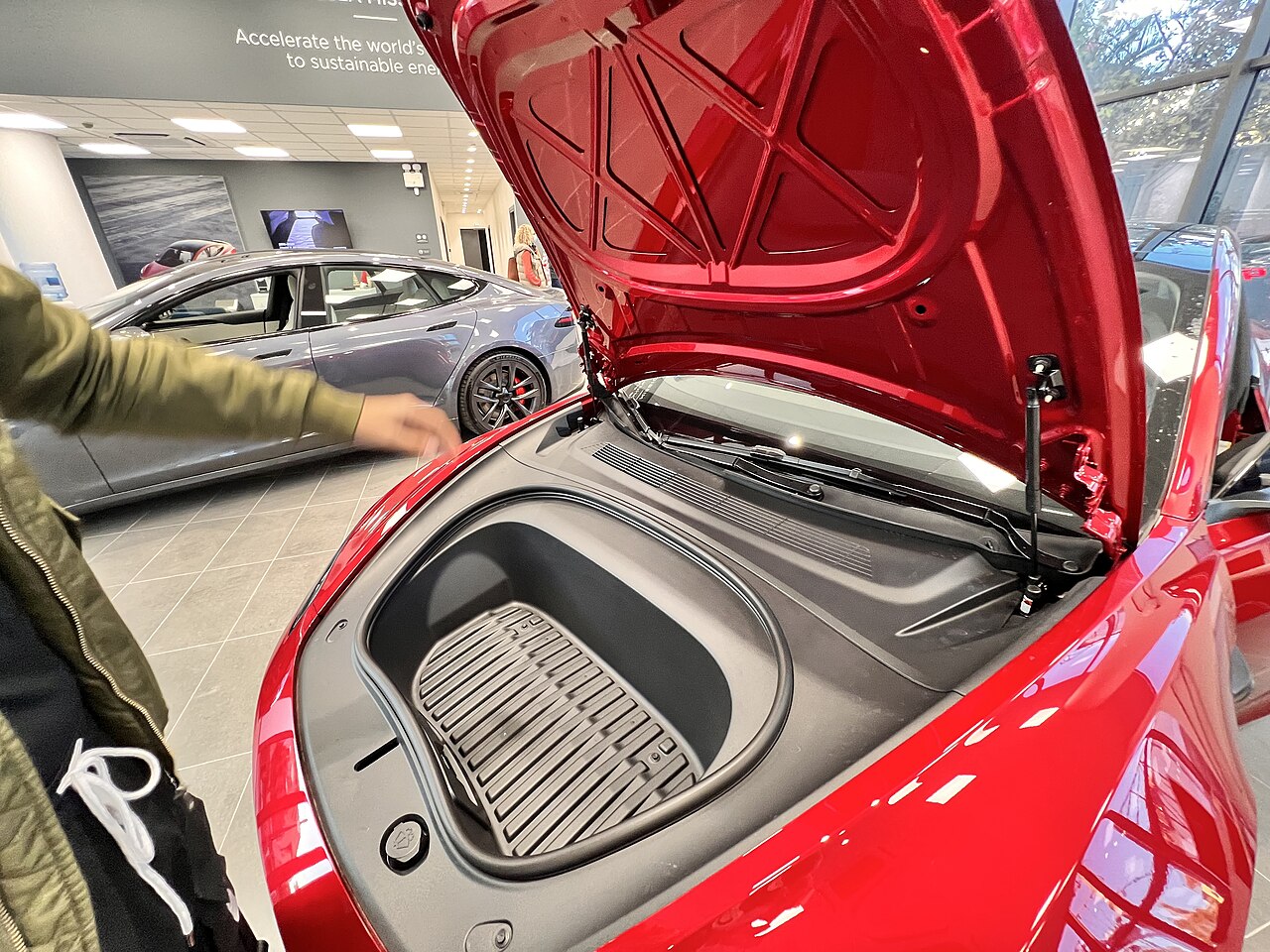
- Get into the frunk. If the car is completely dead and locked, pop the tow-eye cover on the front bumper. Behind it (or just inside the opening) are two thin wires — touch a 12V source’s positive to the red/marked lead and negative to ground, and the frunk latch releases.
- Find the battery. On the Model 3 it sits under the frunk liner; on some Model Y builds it’s under the rear cargo floor. Peel back the cover to expose the terminals.
- Connect a portable jump pack. Red clamp to the positive terminal, black clamp to a bare metal ground point on the body — not the negative terminal directly.
- Power on the pack. Within a few seconds the car should wake, the screen should boot, and the contactors will click closed as the DC-to-DC converter starts recharging the 12V battery.
- Disconnect in reverse. Black clamp first, then red.
Two hard rules: you cannot jump a Tesla from another Tesla (its 12V system isn’t set up to donate power), and you should use a proper lithium jump pack rated for at least 400 peak amps. A compact unit like the NOCO Boost Plus GB40 lives in the frunk, jump-starts your 12V system in seconds, and doubles as a USB power bank and flashlight — genuinely the one item worth keeping in every Tesla. If you’d rather build out a fuller kit, see our Tesla emergency roadside kit guide.
Once you’ve woken the car, don’t just carry on as normal. A 12V battery that went flat is almost always telling you it’s near the end — book service before it strands you again.
Replacement Cost and Your Options
When it’s time to replace, you have three routes. Prices below are typical 2026 U.S. figures; expect the same ballpark in Canadian dollars north of the border.
| Option | Lead-acid | Lithium | Notes |
|---|---|---|---|
| Tesla Mobile Service | ~$180–$320 | ~$250–$550 | Comes to you; correct part; resets the alert properly |
| Independent EV shop | ~$150–$300 | ~$250–$450 | Often cheaper; confirm they know Teslas |
| DIY (lead-acid only) | ~$70–$150 (part) | Not recommended | Follow power-down steps; lithium units are best left to Tesla |
For the lithium battery, the honest advice is to let Tesla or a competent EV specialist handle it. The pack is integrated with the car’s power management, and mobile service will reset the warning and confirm the swap took. Lead-acid replacement is more DIY-approachable, but you must follow Tesla’s on-screen power-down procedure first — there’s still enough current in a 12V system to arc a wrench. Whichever route you choose, replacing the 12V battery is one of the very few true wear items on the car; our Tesla maintenance and service guide puts it in context with the rest of ownership.
How to Make Your 12V Battery Last Longer
You can’t make a lead-acid battery immortal, but a few habits noticeably extend its life:
- Drive regularly. The DC-to-DC converter keeps the 12V topped up while the car is awake. A Tesla driven a few times a week rarely has 12V trouble.
- Mind “vampire” drain during long parking. Sentry Mode, Cabin Overheat Protection, and constant app pinging keep the car awake and lean on the 12V system. If you’re leaving the car for weeks, our guide to vampire drain and parked battery loss walks through what to switch off.
- Use a maintainer for long storage. Storing the car (or an older lead-acid Tesla) for a month or more? A smart trickle charger such as the NOCO Genius2 — which handles both lead-acid and lithium chemistries — keeps the 12V healthy without overcharging. It’s optional for daily drivers, since the car self-manages, but cheap insurance for snowbirds and seasonal storage.
- Don’t ignore the warning. The cheapest 12V battery is the one you replace on your schedule, not on the shoulder of a highway.
For a broader picture of what EV ownership actually costs to maintain, the U.S. Department of Energy’s fueleconomy.gov maintenance breakdown is a useful, unbiased reference, and battery-research outfit Recurrent tracks real-world Tesla battery data. For the official procedure specific to your car, always defer to Tesla’s support pages and your owner’s manual.
Is It Worth Upgrading an Older Tesla to Lithium?
A handful of aftermarket brands sell lithium 12V replacements for older lead-acid Teslas, promising longer life and less weight. They can work, but proceed with eyes open: the car’s battery-management expects a specific voltage profile, some owners report spurious warnings, and you may void goodwill on any related service claim. For most owners, the simpler play is to replace like-for-like and keep a jump pack in the frunk. If you’re chasing longevity, buying a newer Tesla — which ships with the factory lithium unit and its longer warranty — is the cleaner path; new orders placed via a Tesla referral link still include 3 months of free FSD (Supervised) as of this writing. Browse more practical ownership tips in our US Tesla guides.
Frequently Asked Questions
Can you jump-start a Tesla like a regular car?
Not exactly. You apply 12V power to wake the car and pop the frunk, then let the main high-voltage pack take over recharging. You can’t crank an engine because there isn’t one — and you can’t jump a Tesla from another Tesla. Use a portable lithium jump pack rated for at least 400 peak amps.
How long does a Tesla 12V battery last?
The older lead-acid unit typically lasts two to four years. The lithium-ion battery Tesla adopted in 2021–2022 is rated far longer — often eight to ten years or more, sometimes the life of the car.
What happens if I ignore the 12V battery warning?
The battery can weaken to the point where the car can’t close its high-voltage contactors. Then it won’t drive or charge, and you’ll need a jump just to move it. Treat the warning as a days-not-weeks repair.
How much does a Tesla 12V battery replacement cost?
In 2026, expect roughly $150–$320 for a lead-acid swap and about $250–$550 for the lithium unit, including Tesla mobile service. Independent EV shops are often a little cheaper. Prices are similar in Canadian dollars.
Can I replace the Tesla 12V battery myself?
The older lead-acid battery is DIY-approachable if you follow Tesla’s on-screen power-down steps first. The lithium unit is best left to Tesla or a qualified EV specialist, because it’s tied into the car’s power management and the alert needs a proper reset.
Does the 12V battery affect my driving range?
No. Range comes from the high-voltage pack. A failing 12V battery won’t reduce your miles — but it can stop the car from turning on at all, which matters a lot more.
The Bottom Line
- The 12V (low-voltage) battery runs your Tesla’s electronics and lets the main pack connect — when it dies, the car won’t wake, unlock, or drive.
- Older Teslas use a lead-acid battery (2–4 years); 2021–2022-onward cars use a longer-lived lithium unit.
- Take any 12V warning seriously and act within days, not weeks — before the car strands itself.
- Keep a compact lithium jump pack in the frunk; it’s the cheapest insurance against a dead-battery lockout.
- Replacement runs roughly $150–$550 depending on chemistry and where you have it done; leave lithium swaps to Tesla or an EV specialist.
Information current as of August 2026. Prices, part specifications, and Tesla procedures change — always confirm against Tesla’s official support pages and your owner’s manual before working on your vehicle. This article is for general information only and is not professional repair advice. Some links are affiliate or referral links; see our disclosure page. Image credit: Tesla Model 3 frunk by Mpelas199, released under CC0 (public domain), via Wikimedia Commons.

About the author: Lifei Zhou
Model Y owner since 2022Ontario STO registered apprentice · 310SWorks on Porsche, Mercedes, BMW, Audi weeklyHundreds of readers referred (est.)
Lifei is a Tesla owner based in Canada, writing practical, fact-checked Tesla guides for US and Canadian drivers — buying, ownership, insurance, charging, and TSLA investing, all from first-hand experience.